
Your product photo starts before the prompt
From a phone photo of your product to an AI ad scene in ChatGPT or Gemini: prepare the product, pick the mood, then paste a ready prompt. Worked example on a juice bottle.
One ad-ready image of your real product in a new scene, made in ChatGPT or Gemini, and checked detail by detail against the original so the label, logo and shape are still yours.
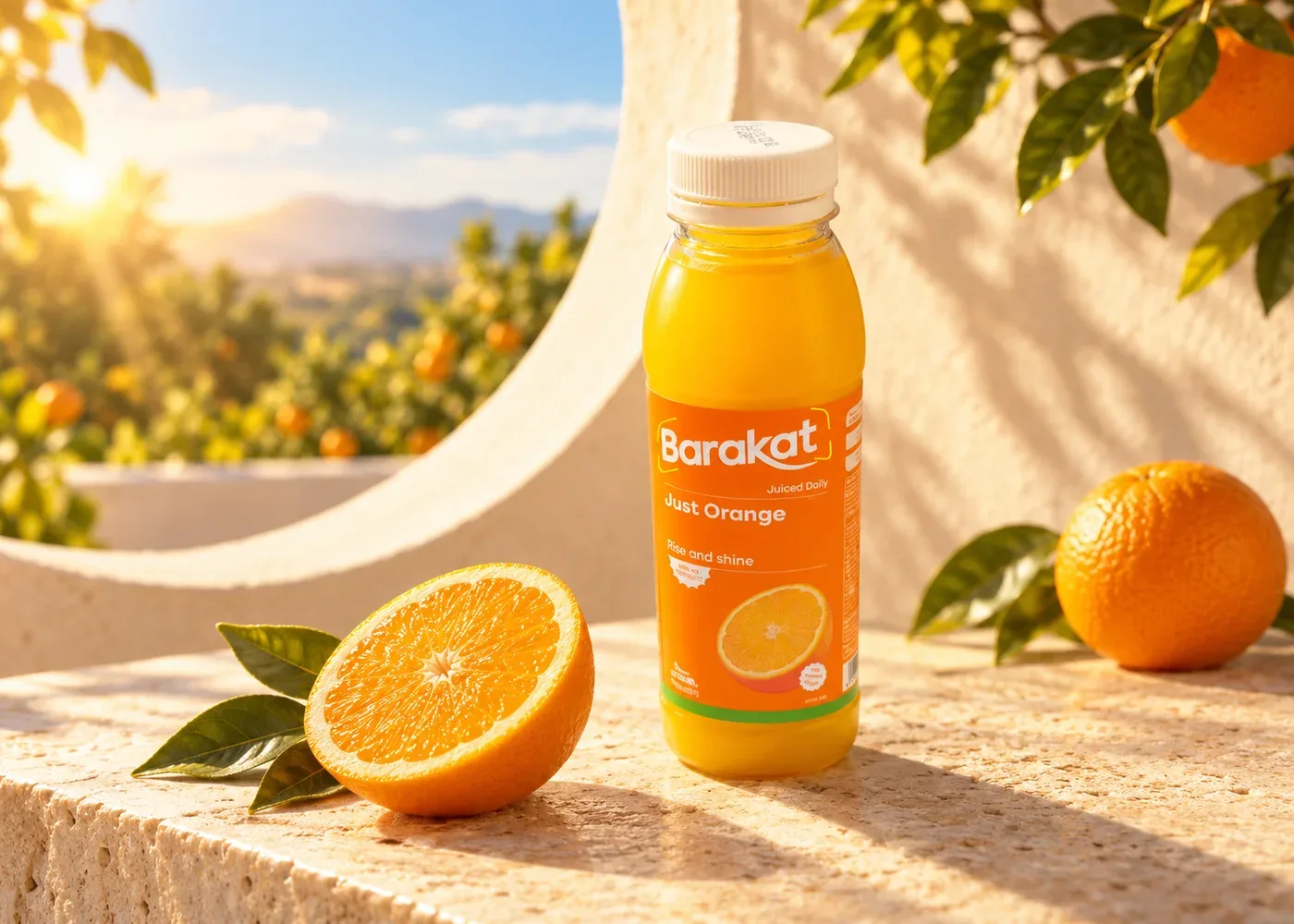
AI-generated example from the episode's walkthrough. Always check the product details before you use an image like this.
What you need before you start
Photograph the product clearly
Start with the real product. This photo is the reference the tool works from, and the one you come back to when you review the result.
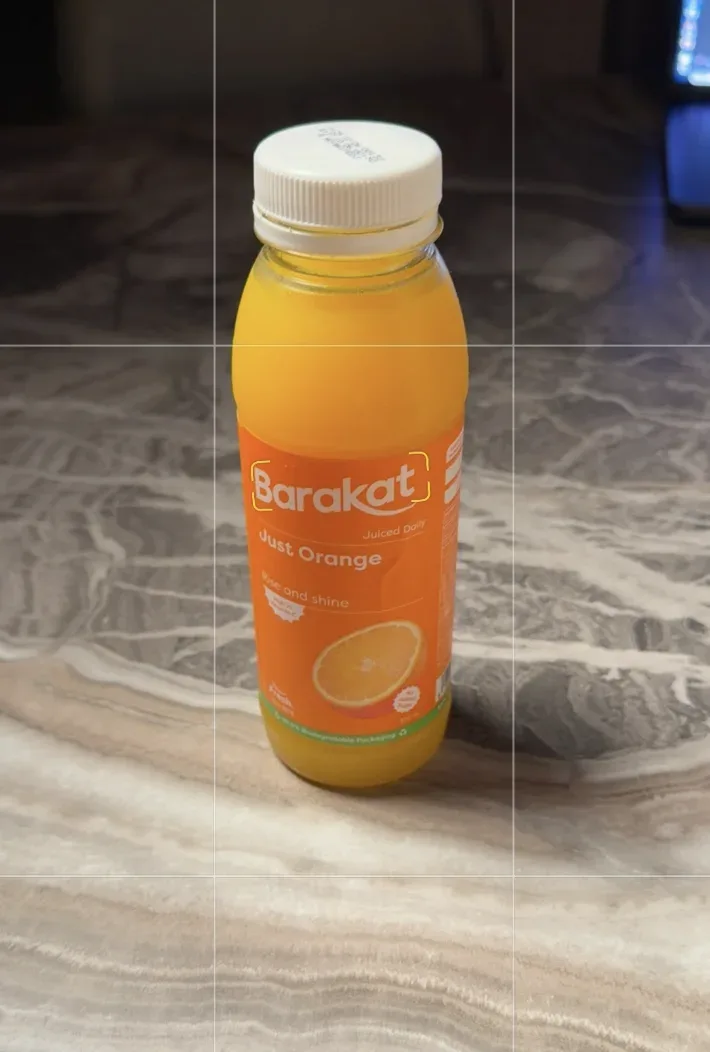
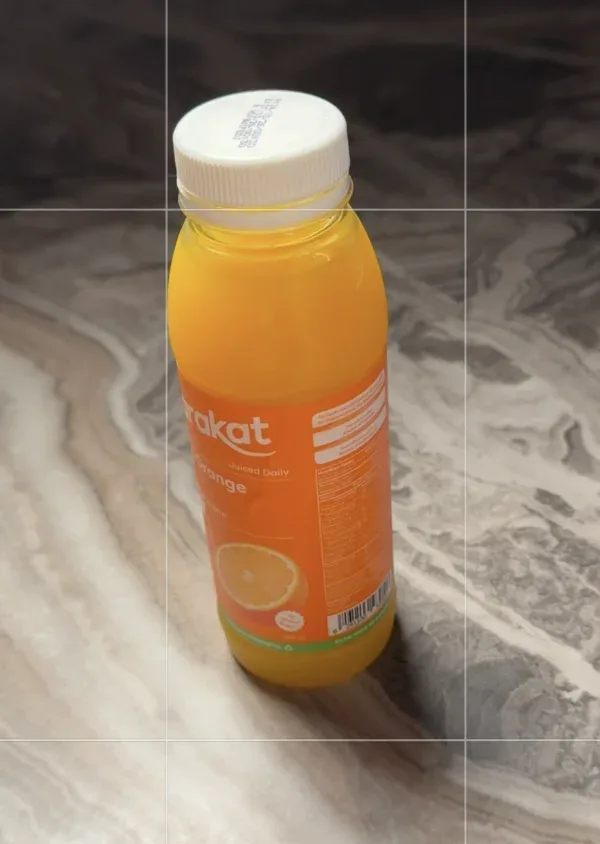
- Keep the whole product inside the frame, from the cap to the base.
- Get close enough that the logo and text are readable, and avoid reflections that cover them.
- If the side has important details, take a second photo of the same product.
- Upload the original photo file when you can, and take a closer shot if the text is not clear.
Before you move on: do not rely on the tool to guess a part that is not in your photos. An angle close to the original reduces the need to invent sides it has not seen.
Pick references and give each one a role
Search Pinterest or Behance for the mood you want, then turn your taste into a clear description.
Example searches
orange juice product photography
beverage photography warm sunlight
minimal product photographyDecide what you want to take from each reference:
Soft side light, or warm sun with clear shadows.
Product in the center, space around it, few props.
A calm setting, a stone surface, or colours that suit the product.
Example line to write for the tool
I want the warm lighting from the first reference and the space around the product from the second. Create a new scene that suits my product.Take the idea of the lighting and layout. Do not ask for a full copy of someone's ad, and do not use the reference's product or logo in place of yours.
Upload the photos in one message
Pick one tool and stay in one chat. Attach the front photo, the extra angle and your references in the same message.
ChatGPT (ChatGPT Images 2.6)
Open chatgpt.com or the app. In the message box select +, then Add photos & files, and pick your photos. Images are available on all plans.
Gemini (Nano Banana 2)
Open gemini.google.com or the app. Set the model to Flash or Pro, then select Add files, then Upload Files. Up to 10 files per prompt.
Two traps. On the free ChatGPT plan you can upload only 3 files per day, so send the front photo plus 2 references, or do it on a paid plan. In Gemini, the Flash-Lite model uses Nano Banana Lite, which is not built for several reference images: switch to Flash or Pro first.
Paste the full prompt as it is
Copy the whole prompt below in English, exactly as it is, and paste it in the same message as your photos. It already tells the tool what each image is for: your product photo is the identity reference, the other images are for lighting and mood only.
The full prompt
Act as an expert creative director, art director, and product photographer. Study the attached product image and reference images, then create an original, visually compelling image featuring my product.

Objective
Use the reference images to understand the artistic direction: their style, mood, atmosphere, lighting, colors, composition, and overall visual quality. Develop a fresh creative concept that brings those qualities to my product.
The finished image should feel visually connected to the references while introducing a clearly original idea, setting, and composition. Aim for a stronger image through thoughtful art direction, clear product presentation, and a distinctive visual story.

1. Understand the role of each attachment
Product image: the source of truth for the product
Carefully inspect the attached product before designing the scene. Preserve its identity and all visible defining features, including:
- Shape, silhouette, proportions, and construction.
- Materials, surface finish, texture, and actual colors.
- Logos, typography, label artwork, and placement of branding.
- Distinctive details such as edges, seams, engravings, openings, handles, caps, or other components, where applicable.
Keep the product accurate and recognizable. You may adapt its placement, lighting, reflections, and perspective to suit the new scene, but these changes must remain consistent with the same physical object.
Favor camera angles supported by the supplied product image. Avoid inventing unseen construction details, accessories, packaging, or label text. Include additional product components only when they appear in the supplied product images or are explicitly requested.
Reference images: the sources of artistic direction
Use these images to understand the desired visual treatment. Any products, logos, or branding appearing in the references belong to those references and should not transfer to my product.

2. Analyze the references before creating the image
Conduct a careful visual analysis of all the reference images. Identify the creative decisions that give them their particular look and emotional impact.
Study:
- Mood and personality: What does the image communicate: calm, energy, sophistication, warmth, precision, playfulness, mystery, or another feeling? Identify what in the image creates that impression.
- Color relationships: Dominant and accent colors, saturation, temperature, tonal range, and the relationship between the product and its surroundings.
- Lighting: Direction, softness or hardness, light sources, falloff, highlights, shadow density, rim lighting, reflections, and how light reveals materials.
- Composition: Product placement, framing, crop, balance, negative space, focal hierarchy, visual flow, and the relationship between foreground and background.
- Camera treatment: Viewpoint, perspective, apparent focal length, depth of field, focus placement, and sense of scale.
- Environment and materials: Background surfaces, textures, architectural elements, props, and how they support the product.
- Image treatment: Photographic realism, CGI characteristics, stylization, contrast, grain, sharpness, and retouching.
- Creative idea: The underlying visual story or relationship that makes the image memorable.
Distinguish the recurring stylistic qualities from incidental objects or arrangements. Translate the qualities that make the references effective into a new visual idea.
If the references differ substantially, choose the most appropriate one as the primary artistic direction. Incorporate compatible elements from the others selectively so the final image has one coherent visual language.

3. Develop a fresh concept specifically for my product
Use your understanding of the product and references to develop three distinct creative directions internally, then select the strongest one.
Each direction should have a meaningful central idea and a deliberate relationship to the product's visible design, materials, form, or clearly established purpose. Avoid inventing product benefits, ingredients, technical specifications, or performance claims.
Give the selected concept:
- A fresh visual premise.
- A purposeful setting or background.
- An original composition and spatial arrangement.
- Lighting that reveals the product beautifully.
- A clear emotional connection to the reference imagery.
Go beyond placing my product into an existing reference scene. Reimagine how the same artistic sensibility could produce a new image made specifically for this product.
You have substantial creative freedom over the environment, surfaces, props, atmosphere, framing, and visual storytelling. Keep the product itself faithful to the supplied image.
Interpret "better" as a clearer focal point, more intentional composition, stronger visual coherence, more convincing material rendering, and a more memorable idea. Every added element should contribute to the image.

4. Art-direct the finished image
Make my product the unmistakable hero. Its silhouette and defining features should remain readable, with a clear visual hierarchy that guides attention toward it.
Choose the camera angle, product placement, background, and lighting together as one integrated composition. Use negative space deliberately and ensure any props support the central idea.
Match the references' level of realism or stylization. Where the image depicts a physical scene, maintain believable perspective, scale, contact shadows, reflections, and material behavior. Where the concept uses surreal elements, make those elements visually intentional and internally consistent.
Render surfaces according to their actual material characteristics. Preserve natural texture and appropriate highlights without making every surface excessively glossy or artificially smooth.
Preserve existing product branding and label artwork accurately wherever visible. Add headlines, promotional copy, decorative typography, or new logos only if explicitly requested.

5. Review and deliver
Before finalizing, check that:
- The product matches the supplied product image.
- The references' mood and visual treatment are recognizably reflected in the result.
- The concept and composition are meaningfully original.
- The product remains the focal point.
- Lighting, perspective, materials, and shadows work coherently.
- Branding and visible product details are accurate.
- The frame is free of distracting clutter, accidental duplication, distorted geometry, and unwanted text.
Refine any weak areas before delivering.
Generate one finished product image at the highest supported quality and resolution. Use my requested aspect ratio; if none is specified, follow the primary reference's format while ensuring the product is framed effectively.
Keep the visual analysis and concept exploration internal. Return the final image.Last line: the aspect ratio
Aspect ratio: 4:5Add this line at the end of the same message. 4:5 suits a vertical feed post. In ChatGPT you can also choose the shape with the aspect ratio picker.
Describe a scene if you want one, then send
The prompt leaves the scene free and locks the product. If you have a specific scene in mind, add a short description after the aspect ratio line, in English or Arabic. Otherwise let the tool propose a scene from your references.
Example for the juice bottle
Scene: the juice bottle on a light stone ledge on a terrace, with a citrus garden behind it. An orange and half an orange around the bottle, not covering the label.
Lighting: warm sunlight from the side of the scene, with a contact shadow under the bottle.
Angle: close to the front product photo.Send the message and wait. Image generation can take a few minutes. When it is ready, open the image at full size.
The example image at the top of this guide is AI-generated and landscape. It shows how the scene can change; it is not proof that every detail of the bottle matches the original.
Zoom in, compare, then fix
Do not judge by the beauty of the background. Open the original photo and the result side by side and check the product:
Bottle height and width, the curve of the shoulder, the size of the cap.
Product and bottle colour, transparency and reflections.
Where they sit, their size and their direction on the bottle.
Product name and every visible word or number, with nothing added.
Contact shadow, the product sitting firmly on the surface, nothing covering the label.
If something is off, name it exactly
The logo on the label is different from the original product photo. Fix it and keep the rest of the image exactly as it is.Then compare again. In ChatGPT you can also open the image, choose Select, highlight only the wrong area and describe the fix. The highlight is not always precise, so check the whole image after each edit.
The prompt makes your request clear. Your review decides the result. If the text or the product identity is still not accurate, do not use the image in an ad. Use your original product photo in a manual composite instead.
Try it on your product
Sources: OpenAI Help Center (Images in ChatGPT; Uploading files and audio to ChatGPT), OpenAI announcement of ChatGPT Images 2.6 (4 November 2026), Gemini Apps Help (Generate and edit images; Attach and analyze files; Limits and feature availability). Example images are from the owner's walkthrough; the ad scene is AI-generated. Plans, limits and menus can differ by account and country. Checked November 2026.
Want your team to use this at work?
I'm Abdulaziz Alshamsi, a certified AI trainer and consultant in Abu Dhabi. I train government and company teams to use AI in their daily work. Message me to discuss a session for your team.