
The Professional Prompt Playbook
How to direct ultra-realistic marketing images with Nano Banana Pro, then turn approved frames into believable video with Veo or Gemini Omni.
A professional prompt is a creative production brief, not a pile of quality adjectives. Define the business job, hero subject, visual hierarchy, camera, light, materials, references, and delivery format. For video, direct what changes over time: subject motion, camera path, physics, sound, and the final frame.
Know which model is doing which job
Nano Banana Pro: stills
Gemini 3 Pro Image creates and edits professional still images. It supports high-resolution output, text, reference images, composition control, and complex visual instructions.
Veo or Gemini Omni: motion
Veo 3.1 (in Google Flow) and Gemini Omni Flash (in the Gemini app and Flow) turn text or an approved first frame into video. The motion prompt controls action, camera movement, time, sound, and the ending composition.
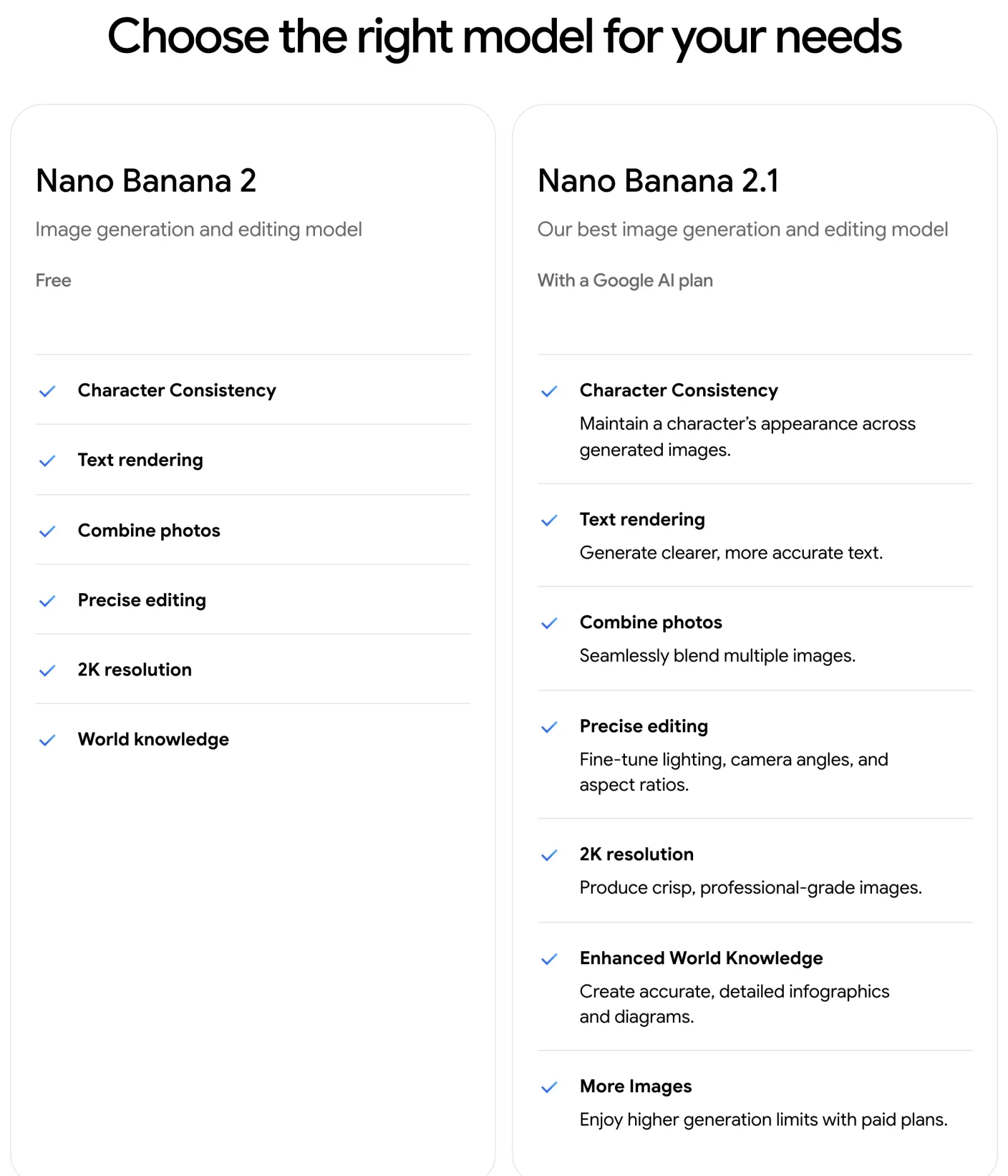
Current product note (November 2026): in the Gemini app, free accounts create images with Nano Banana 2, and Google AI plans get Nano Banana 2.1, which Google now calls its best image model. Nano Banana Pro remains the premium choice for complex designs and detailed control: in the Gemini app, open the image's three-dot menu and choose "Redo with Pro" (Google AI Plus, Pro, or Ultra); in Google Flow, pick Nano Banana Pro as the image model. This guide focuses on Pro because the goal is campaign-quality production, and the same prompts work on 2.1.
Nano Banana Pro: 1K, 2K, or 4K image output on supported surfaces.
Current API documentation: up to 14 total references, with surface and category limits. Pro lists up to 6 high-fidelity object references, 5 character references, and 3 style references.
Generated media: Google says all generated images and Veo videos carry an invisible SynthID watermark. Images made in the Gemini app also get a visible watermark.
The 10-part professional image prompt
Google's own Nano Banana Pro guide starts with subject, composition, action, location, and style, then adds aspect ratio, camera, lighting, text, factual constraints, and reference roles. The production version below places those ingredients in decision order.
Create one ultra-realistic commercial photograph for [CHANNEL OR CAMPAIGN].

COMMERCIAL OBJECTIVE
[What the image must make the audience notice, feel, and do.]

AUDIENCE AND MESSAGE
[Audience]. Communicate [one message] with a [mood] feeling.

SUBJECT
[Exact product, person, food, vehicle, room, or service moment. Include material, shape, wardrobe, expression, and non-negotiable details.]

SCENE AND ACTION
[Location, time, weather, surfaces, props, and one clear action.]

COMPOSITION
[Aspect ratio]. [Shot size and angle]. Place the hero at [position]. Reserve clean negative space at [location] for [headline or CTA]. Keep one dominant focal point.

CAMERA
[Camera look], [one lens], [aperture or depth of field], focus on [target]. Use realistic perspective and optical falloff.

LIGHTING AND COLOR
[Key source, direction, softness, temperature, fill, rim, shadow quality, and restrained palette.]

PHYSICAL REALISM
[Material response, contact shadows, reflections, condensation, crumbs, pores, fabric weave, micro-scratches, flyaway hairs, or atmosphere.] Keep imperfections appropriate to the production style.

REFERENCES AND BRAND
Use Image 1 for [identity or product geometry]. Use Image 2 for [logo or packaging]. Use Image 3 for [style or location]. Preserve [exact elements]. If text is required, render exactly: "[FINAL COPY]" at [location] in [typographic style].

CONSTRAINTS AND OUTPUT
[Positive description of the clear result]. One [hero item or person]. Accurate anatomy and contact. Natural shadows and reflections. No invented claims or extra labels. Output [1K, 2K, or 4K] in [ratio].
Realism comes from physics, not hype words
"Ultra-realistic, 8K, HDR, masterpiece" can describe quality, but it does not explain why the scene should look photographed. Use observable production details that agree with one another.
Light has a source
Name its direction, size, hardness, temperature, and fill. A large side softbox creates broad highlights and soft shadows. Hard noon sun creates short, crisp shadows.
Materials respond differently
Glass refracts and creates caustics. Metal carries controlled reflections. Fabric folds and compresses. Syrup forms a meniscus. Skin shows tonal variation and pores.
Imperfection matches the medium
A polished packshot needs clean, controlled micro-detail. UGC needs slight framing asymmetry, natural exposure variation, and plausible phone-camera softness.
Composition has one hierarchy
Choose one hero, one message, and one path for the eye. State where the hero sits and where copy can live without covering it.
Avoid lens soup: do not ask for an ultra-wide, macro, telephoto portrait at the same time. Pick the optical behavior that serves the shot. For example, 85mm for a compressed portrait, 100mm macro for food detail, 24mm shift-style perspective for interiors.
Crumbs, steam, uneven garnish, syrup viscosity, chilled condensation, controlled shine, and real contact with the plate.
Exact silhouette, seams, label alignment, surface texture, liquid level, edge highlights, reflection behavior, and weight on the surface.
Natural pores, fine facial hair, flyaway hair, catchlights, asymmetry, fabric tension, believable hands, and identity preservation.
Reference images are production controls
Nano Banana Pro can combine many references, but more inputs are not automatically better. Each upload should control one clear part of the result.
Clean face or character reference, neutral angle, accurate skin tone, minimal obstruction.
Front, side, back, packaging, material close-up, and exact label geometry.
The body pose, camera angle, framing, or spatial arrangement to follow.
The actual room, location, surface, or architectural geometry to preserve.
Lighting behavior, color relationship, grade, set design, or editorial mood.
Logo, pattern, typography, UI screenshot, or finalized copy to reproduce.
Use Image 1 only for the person's identity and facial structure. Use Images 2 and 3 for the exact product geometry and label. Use Image 4 for the pose and crop. Use Image 5 for lighting and palette only. Preserve the face, product silhouette, logo, label wording, and brand colors. Change only the environment and action described below.
- Start clean: use sharp, correctly oriented images with minimal clutter.
- Describe what must survive: face, logo, label, garment cut, room dimensions, or interface layout.
- Iterate locally: "Keep everything unchanged; warm the key light slightly" is safer than regenerating the whole brief.
- Reuse approved outputs: include the last successful image in the next turn to maintain continuity.
- Use a pose reference: complex body positions are more reliable when pose and identity are separate inputs.
Write a motion brief for Veo or Omni
Once the still frame is approved, stop redescribing it. Use the video prompt to explain change over time. Google's video prompt guidance, which covers both Veo and Gemini Omni Flash, emphasizes subject, action, style, camera position and motion, composition, focus, ambiance, dialogue, and sound.
Image-to-video. Use the uploaded image as the exact opening frame. Preserve [identity, product geometry, label, logo, wardrobe, environment, and color].

FORMAT
[4, 6, or 8]-second [9:16 or 16:9] single shot, [realistic commercial, editorial, or UGC] style.

TIMED ACTION
0 to 2 seconds: [subtle opening action].
2 to 6 seconds: [main subject action and camera movement].
6 to 8 seconds: [settle into a clean final frame with CTA-safe space].

CAMERA AND PHYSICS
[Static, dolly, pan, arc, or handheld], [speed], [focus behavior]. Keep motion physically plausible, with stable object geometry, believable gravity, liquid, fabric, hair, reflections, and shadows.

AUDIO
[Ambient sound], [specific sound effect], [music character], [optional exact dialogue in quotes].

NEGATIVE PROMPT FIELD
[Geometry drift, label mutation, extra fingers, flicker, rubbery motion, camera roll, text changes, duplicated props.]
First frame
Choose the Nano Banana image closest to the intended opening composition. Veo and Omni use an image input as the initial frame.
One shot
Keep each generation to one clear camera move and one main action. Assemble the campaign sequence in editing.
Timed beats
For complex motion, describe a simple beginning, middle, and end within the available clip length.
Sound design
Specify ambience, sound effects, music character, and exact dialogue when needed. Veo 3.1 and Omni generate audio with the video.
Where to run it (November 2026): in the Gemini app, Gemini Omni has replaced Veo: it makes videos with audio of up to 10 seconds (15 on Google AI Ultra) from text or up to 5 photos and needs a Google AI plan. In Google Flow, Veo 3.1 makes 4, 6, or 8 second clips in 16:9 or 9:16 from a first frame or a first and last frame; Google announced that Veo 3.1 Fast and Veo 3.1 Quality leave Flow on 5 December 2026, so use Veo 3.1 Lite, the Veo model that stays, or Omni Flash 1.2, the two Google recommends. Omni Flash 1.2 in Flow makes 3 to 10 second clips (up to 15 seconds on Google AI Plus, Pro, and Ultra). The 8-second beats in these prompts fit both. Not every tool has a negative prompt field: if yours has none, end the prompt with the list as plain nouns, without "no" or "don't".
The professional generation workflow
- 01Write the campaign brief
One audience, one objective, one message, one hero, one format.
- 02Prepare truthful references
Identity, product, pose, location, style, logo, and copy each get a declared role.
- 03Generate the hero still
Lock composition, lighting, material behavior, and copy-safe space before adding motion.
- 04Audit at 100 percent
Check hands, eyes, labels, logos, text, edges, shadows, reflections, claims, and likeness.
- 05Revise one variable
Keep everything else fixed. Save the approved output as the next reference anchor.
- 06Generate a video first frame
If the still is 4:5, create a matching 9:16 or 16:9 version before animation.
- 07Animate the change
Direct action, camera path, timed beats, sound, physical behavior, and final frame.
- 08Finish in post
Use real logos, UI, legal copy, prices, subtitles, color management, and final exports.
Keep marketing claims outside the imagination loop: verify prices, ingredients, performance data, credentials, testimonials, awards, interface metrics, and regulated statements. For important copy, generate the concept first and typeset the final approved wording in post-production.
Premium pistachio kunafa launch
Create one ultra-realistic 4:5 vertical premium launch advertisement for an upscale Gulf cafe. The commercial objective is to make freshness, texture, and craftsmanship immediately irresistible while keeping the portion believable.

Hero subject: one square slice of pistachio kunafa on a handmade charcoal stoneware plate. Show a clean cross-section with crisp, irregular golden kunafa strands, a dense pistachio cream center, finely chopped pistachios, and a light natural syrup sheen. The dessert looks freshly plated, not oversized or artificially perfect.

Scene: dark emerald marble table, restrained warm brass detail in the distant background, one folded linen napkin placed behind the plate. The surface is clear and uncluttered.

Composition: 4:5 vertical. Tight three-quarter close-up at table height. Place the dessert in the lower center and reserve the upper 30 percent as clean, softly graded negative space for a headline. One dominant focal point.

Camera: full-frame commercial food photography, 100mm macro lens look, f/5.6 depth of field. Exact focus on the cut edge and pistachio texture. Natural optical falloff, softly blurred background.

Lighting: large diffused key light from back-left, a narrow warm rim that catches the pastry strands, subtle front fill, controlled specular highlights, deep but detailed shadows. Palette: pistachio green, toasted amber, charcoal, and muted brass.

Physical realism: tiny crumbs on the plate, uneven chopped pistachios, believable syrup viscosity and meniscus, subtle plate texture, accurate contact shadow, restrained warmth. Use Image 1 for the real dessert structure and portion, Image 2 for the exact logo if included, and Image 3 for lighting and palette only. Preserve the dessert proportions and logo shape.

Render without invented prices, ingredients, or nutrition claims. Output one 4K image. For the future video first frame, also make a matching 9:16 version with the same hero scale and upper copy-safe space.
Image-to-video. Use the approved 9:16 dessert image as the exact opening frame. Preserve the dessert shape, plate, logo, colors, lighting, and upper copy-safe space. Create an 8-second premium food commercial in one shot.

0 to 2 seconds: the camera is almost still; a faint wisp of natural steam rises and the warm edge light glints across the pastry strands. 2 to 6 seconds: a slow 8 percent dolly-in while a small stream of pistachio sauce lands on the top and settles with realistic viscosity; a few chopped pistachios fall and bounce naturally. 6 to 8 seconds: movement stops on the clean hero frame.

Maintain realistic gravity, crumbs, liquid behavior, contact shadows, and focus. Audio: quiet cafe room tone, delicate pastry crackle, soft sauce pour, restrained premium music sting.

Negative prompt field: dessert deformation, changing plate, logo mutation, extra utensils, rubbery sauce, excessive steam, flicker, camera roll, artificial sparkle.
Luxury facial serum campaign
Create one ultra-realistic 4:5 vertical hero advertisement for a premium facial serum. The objective is to communicate precision, calm, and tactile luxury without inventing product claims.

Hero subject: the exact amber glass serum bottle from Images 1 to 3, upright on a pale honed travertine plinth. Preserve the bottle silhouette, cap construction, pipette proportions, liquid level, label wording, spacing, logo, and brand colors. The bottle is the only product in frame.

Scene: a minimal warm-stone set with one soft curved shadow and a shallow reflective pool beside the plinth. A single translucent drop of serum rests on the stone near the bottle, sized realistically.

Composition: 4:5 vertical, centered product with a slight lower-third placement. Reserve the upper-left area as clean copy-safe space. Straight verticals and premium catalog precision.

Camera: 85mm product lens look, eye-level with a slight 5-degree downward angle, f/8 so the full label and cap are sharp. Natural lens compression, accurate edges, no wide-angle distortion.

Lighting: large diffused key from upper-left, narrow strip light on the right edge of the glass, very soft fill, warm-neutral 4300K feeling. Controlled reflections that reveal the bottle shape without hiding the label.

Physical realism: true amber-glass refraction, subtle caustic light on the stone, tiny manufacturing variations, clean label edge, delicate micro-scratches visible only in highlights, believable contact shadow, realistic serum viscosity. Use Image 4 only for the exact logo and Image 5 only for light direction and palette.

If copy is included, render only the approved short headline "[FINAL HEADLINE]" in the upper-left, with a restrained modern sans-serif style. Keep the set otherwise clear. Output one 4K image. Also produce a matching 9:16 first-frame version for video.
Image-to-video. Use the approved 9:16 serum image as the exact opening frame. Preserve the bottle geometry, cap, label, logo, liquid level, plinth, and lighting. Create an 8-second single-shot luxury product film.

0 to 2 seconds: static frame as a soft highlight travels naturally along the curved glass. 2 to 6 seconds: slow controlled arc camera move of approximately 15 degrees from left to right while one serum drop slides down the pipette inside the bottle; the shallow pool produces a subtle moving reflection. 6 to 8 seconds: the camera settles with the label perfectly front-facing and the copy-safe area clear.

Audio: quiet glass-room ambience, one delicate liquid drop, low warm tonal swell. Negative prompt field: label mutation, bottle warping, cap movement, changing liquid level, duplicate bottle, floating product, reflection mismatch, flicker, excessive lens flare.
Emirati AI founder editorial portrait
Create one ultra-realistic 4:5 vertical editorial portrait for the personal brand of the adult Emirati AI founder shown in Images 1 and 2. The objective is to communicate thoughtful technical authority, curiosity, and approachability.

Identity: preserve the exact facial structure, proportions, skin tone, eyes, eyebrows, nose, mouth, beard pattern, and age from Images 1 and 2. Keep natural asymmetry and a calm, focused expression. Do not beautify, age, or reinterpret the face.

Wardrobe: pristine white kandura and the accurately arranged ghutra from Image 3, with natural fabric thickness, folds, seams, and gravity. No invented badges, medals, titles, or accessories.

Scene: a refined AI research workspace inspired by Image 4, with a softly out-of-focus monitor showing an abstract node network with no readable claims, a few real books, and restrained warm wood. The subject stands three-quarter to camera, one hand resting naturally on the desk, looking directly at the lens.

Composition: 4:5 vertical environmental portrait, waist-up, eye-level, subject on the right third, generous clean negative space on the left for optional editorial copy. Hands remain naturally visible.

Camera: full-frame editorial photography, 50mm lens look, f/3.2, realistic facial proportions, sharp focus on the near eye, gentle background separation.

Lighting: large soft key 45 degrees camera-left, cool subtle monitor fill, warm practical light behind, restrained rim on the shoulder, natural catchlights, detailed shadows. Physical realism: visible skin pores, fine facial hair, slight under-eye texture, flyaway fabric fibers, accurate fingers, natural hand pressure on the desk, subtle sensor grain.

Use Image 5 for lighting behavior only. Keep the image free of titles and credentials unless exact approved copy is supplied. Output one 4K image and a matching 9:16 video first frame.
Image-to-video. Use the approved 9:16 portrait as the exact opening frame. Preserve the person's identity, face, beard, skin tone, kandura, ghutra, body proportions, office, and lighting. Create an 8-second understated editorial brand film in one shot.

0 to 2 seconds: the subject breathes naturally and blinks once, maintaining calm eye contact. 2 to 6 seconds: a very slow dolly-in of approximately 6 percent as the subject briefly glances toward the monitor, then returns attention to camera; the monitor glow shifts subtly without introducing readable text. 6 to 8 seconds: the subject settles into the original confident expression with left-side copy space clear.

Fabric and facial motion remain subtle and physically natural. Audio: quiet office ambience, distant keyboard texture, restrained modern tonal pulse. Negative prompt field: face drift, changing beard, altered ghutra, lip movement, extra fingers, hand fusion, plastic skin, beauty filter, flicker, camera wobble.
AI transformation consultancy ad
Create one ultra-realistic 4:5 vertical marketing image for a Gulf-focused AI transformation consultancy. The objective is to make an intangible service feel concrete: expert guidance turning a real business workflow into an operational AI system.

Scene: a small working session with the adult consultant from Image 1 and two adult client leaders in the modern meeting room from Image 2. They stand around a large display. The consultant points to a clean, abstract workflow diagram moving from document intake to human review to approved output. The diagram contains simple shapes and arrows, with no invented metrics, client names, or unreadable text. Everyone is engaged in the same discussion, with natural posture and professional warmth.

Composition: 4:5 vertical environmental photograph, medium-wide eye-level frame. Place the human collaboration in the lower two-thirds. Reserve a calm upper-right copy-safe area. The consultant is important but not staged as a celebrity; the visible working outcome is the hero.

Camera: 35mm documentary-commercial lens look, f/4, natural room perspective, all three faces readable, background gently separated.

Lighting: soft daylight from camera-left windows, warm ceiling practicals, realistic monitor spill, neutral skin tones, balanced contrast. Physical realism: natural skin texture, accurate hands and pointing gesture, believable screen reflections, chair contact, fabric folds, slight room wear, realistic cables and table edges.

Use Image 1 only for the consultant's exact identity, Image 2 for architecture, Image 3 for restrained color accents, and Image 4 for the exact logo if placed on one wall. If copy is included, render only "FROM WORKFLOW TO WORKING AI" in the reserved area. No performance claims, client logos, awards, or dashboard numbers. Output one 4K image and a matching 9:16 first frame.
Image-to-video. Use the approved workshop image as the exact opening frame. Preserve every person's identity, the room, the logo, and the simple workflow graphic. Create an 8-second credible consultancy brand film in one continuous shot.

0 to 2 seconds: subtle room movement as the clients look at the display. 2 to 6 seconds: slow lateral truck right while the consultant traces one arrow on the workflow and a client gives a small natural nod. 6 to 8 seconds: the camera settles on the team and the completed workflow, leaving the headline area clear.

Audio: quiet meeting-room ambience, soft marker or touchscreen tap, restrained optimistic music. Negative prompt field: face drift, extra people, duplicated hands, changing logo, invented text, animated dashboard numbers, exaggerated gestures, flicker, fast camera motion.
Modest luxury abaya campaign
Create one ultra-realistic 4:5 vertical luxury e-commerce campaign image for the exact abaya shown in Images 1 to 3. The objective is to show the garment's cut, drape, embroidery, and premium fabric truthfully.

Subject: the consenting adult model from Image 4 wearing the exact abaya. Preserve the model's face, skin tone, body proportions, and age. Preserve the abaya's length, sleeve shape, opening, hem, embroidery placement, thread color, fabric sheen, and closure. Follow the poised walking stance from Image 5 while keeping anatomy natural.

Scene: minimal warm limestone colonnade at early morning, soft desert-toned background, clear floor, no distracting props. A light breeze creates one graceful but physically plausible movement in the lower fabric.

Composition: 4:5 vertical full-body frame, eye-level, 70mm lens look, f/5.6. The model occupies the right two-thirds with clean headline space on the left. Keep feet fully visible and vertical lines straight.

Lighting: broad natural side light from the left, subtle warm bounce from the stone, gentle edge separation, accurate skin tones, detailed black fabric without crushed shadows. Physical realism: visible fabric weave, seam tension, natural folds at elbows and stride, grounded feet, realistic contact shadow, restrained flyaway hair only if visible.

Use Images 1 to 3 exclusively for garment fidelity, Image 4 for identity, and Image 5 for pose. One person, one garment, no added jewelry, handbag, pattern, text, or altered embroidery unless supplied as a separate reference. Output one 4K image and a matching 9:16 first frame.
Image-to-video. Use the approved 9:16 fashion frame as the exact opening image. Preserve the model's identity and the abaya's cut, length, embroidery, seams, color, and opacity. Create an 8-second luxury fashion shot.

0 to 2 seconds: the model holds the opening pose as a light breeze moves only the outer fabric. 2 to 6 seconds: the model takes two slow natural steps while the camera performs a smooth 20-degree arc, keeping the embroidery and full silhouette visible. 6 to 8 seconds: the model stops in a balanced three-quarter pose with the left copy-safe area clear.

Audio: quiet stone courtyard ambience, gentle fabric movement, sparse elegant percussion. Negative prompt field: garment redesign, changing embroidery, exposed or fused limbs, sliding feet, fabric passing through body, identity drift, extra accessories, flicker, fast spin.
Desert resort suite campaign
Create one ultra-realistic 16:9 hospitality campaign photograph of the exact desert resort suite in Images 1 to 3. The objective is to communicate quiet privacy and warm desert luxury while preserving the real architecture, room dimensions, windows, furniture scale, materials, and view.

Scene: blue hour outside with the real dune view from Image 4. Inside, warm concealed lighting reveals lime-plaster walls, textured linen bedding, dark timber, and one low seating area. Styling follows Image 5 but uses only objects that can realistically fit the existing room. Curtains hang naturally with a slight opening near the window.

Composition: 16:9 wide hero image from the actual camera position closest to Image 1. Use a 24mm shift-style architectural lens look, f/8, straight verticals, balanced foreground and window view. Avoid stretching the room or making it appear larger. Reserve the upper-left wall area as clean copy-safe space.

Lighting: physically plausible blend of cool blue-hour exterior light and warm 3000K interior practicals. Preserve window detail, soft lamp pools, realistic shadow transitions, and natural reflections. Physical realism: accurate fabric compression, imperfect linen, subtle plaster texture, believable glass reflections, furniture contact shadows, no glowing surfaces without a light source.

Use Images 1 to 3 as geometry truth, Image 4 for the actual exterior, and Image 5 for palette and styling only. Keep the room unoccupied and serene. Do not add pools, fireplaces, amenities, views, furniture, or architectural features that do not exist. Output one 4K 16:9 image.
Image-to-video. Use the approved 16:9 room image as the exact opening frame. Preserve the room geometry, furniture, windows, materials, exterior view, and lighting. Create an 8-second single-shot hospitality film.

0 to 2 seconds: fixed frame with subtle curtain movement and steady practical lights. 2 to 6 seconds: very slow forward dolly toward the window, less than one meter, with natural parallax; a light breeze moves the curtain edge and a distant dune shadow shifts almost imperceptibly. 6 to 8 seconds: settle with the copy-safe wall and real view visible.

Audio: quiet room tone, soft desert wind beyond the glass, delicate fabric movement. Negative prompt field: expanding room, moving furniture, changing architecture, new amenities, warped verticals, window-view mutation, light flicker, fast motion, floating objects.
Analytics dashboard launch
Create one ultra-realistic 4:5 vertical launch advertisement for a B2B analytics platform. The objective is to make complex information feel clear, calm, and decision-ready.

Hero subject: a premium laptop at the exact three-quarter angle from Image 3 on a restrained executive desk. Place the approved dashboard screenshot from Image 1 on the display, preserving its layout, hierarchy, colors, chart shapes, labels, logo, and spacing as closely as possible. Use Image 2 for the exact logo and Image 4 for the surrounding set palette.

Scene: warm porcelain desk surface, ink-navy wall, one slim notebook and one pen in the background, soft architectural daylight. The set is minimal and credible, not a futuristic control room.

Composition: 4:5 vertical. Laptop centered slightly low, screen facing camera without extreme perspective. Reserve the upper quarter as copy-safe space. Keep the interface as the only bright information area.

Camera: 50mm product lens look, f/5.6, focus across the screen and front keyboard edge, realistic screen perspective, controlled depth separation.

Lighting: large soft daylight key from left, subtle warm bounce, restrained edge light, accurate screen luminance, realistic reflections that do not obscure the UI. Physical realism: fine anodized-metal texture, keys with natural wear, grounded contact shadows, slight fingerprints visible only in grazing light, believable screen glass.

If text is generated, render only the approved headline "SEE THE SIGNAL" in the upper copy-safe area. Do not invent customer names, metrics, growth percentages, notifications, or claims. Output one 4K image.

Production note: for launch use, replace the generated screen with the original UI screenshot in post-production. Use Nano Banana Pro to establish scene, device, light, and reflections, then composite the exact interface.
Image-to-video. Use the approved device scene as the opening frame. Preserve the laptop, logo, desk, palette, and empty headline area. Keep the screen content visually stable because the final approved UI animation will be composited in post.

Create an 8-second 9:16 or 16:9 product film. 0 to 2 seconds: static hero frame with a subtle daylight shift. 2 to 6 seconds: slow dolly-in with gentle desk parallax while the screen remains locked and readable. 6 to 8 seconds: focus settles on the display and headline area.

Audio: quiet modern office tone, one subtle interface confirmation sound, restrained electronic pulse. Negative prompt field: changing UI text, invented metrics, screen morphing, keyboard deformation, floating laptop, logo mutation, flicker, aggressive neon glow.
Electric SUV desert campaign
Create one ultra-realistic 16:9 automotive campaign photograph of the exact electric SUV shown in Images 1 to 4. The objective is to communicate quiet capability, premium engineering, and confident Gulf-road presence without inventing specifications.

Vehicle: preserve the exact body proportions, grille or closed front panel, headlight signature, roofline, windows, wheel design, paint color, trim, mirrors, badge, and panel gaps. Use Image 6 only for the correct brand mark. The vehicle has no invented license plate text.

Scene: the real desert road location from Image 5 at first light after a cool night. The SUV moves through a gentle bend on clean asphalt with low dunes in the distance. A restrained trail of fine road-edge dust follows the rear tires without becoming a storm.

Composition: 16:9 wide, low front three-quarter tracking perspective. Car on the right third, road leading from lower-left, clear sky space on the left for copy. Wheels and full body remain visible.

Camera: stabilized 35mm automotive tracking shot, f/5.6, car body sharp, wheels showing physically believable rotational blur, background with directional motion blur that matches speed. No extreme wide-angle stretching.

Lighting: low warm sunrise from rear-left, cool sky fill, controlled reflections that follow the vehicle panels, visible detail in dark trim, realistic headlight brightness. Physical realism: tire contact and compression, correct wheel rotation, dust scale and gravity, road reflection, panel reflections, transparent glass, natural shadow beneath the chassis.

Keep one vehicle only. Do not add performance numbers, charging range, awards, extra badges, or impossible terrain. Output one 4K 16:9 image and a matching 9:16 crop planned from the same scene.
Image-to-video. Use the approved vehicle image as the exact opening frame. Preserve body geometry, wheels, trim, badge, paint, road, dunes, and sunrise direction. Create an 8-second premium automotive tracking shot.

0 to 2 seconds: the vehicle enters stable forward motion at a believable moderate speed. 2 to 6 seconds: camera tracks parallel, then eases into a subtle front three-quarter arc while the road curves; wheels rotate consistently and a thin dust ribbon disperses naturally behind. 6 to 8 seconds: the camera falls back slightly, leaving the sky copy area clear as the SUV continues forward.

Audio: quiet electric drivetrain, realistic tire texture on asphalt, soft desert wind, restrained low-frequency music. Negative prompt field: body morphing, changing wheels, floating tires, reverse wheel rotation, badge mutation, extra vehicles, excessive dust, warped road, camera shake, flicker.
Natural skincare demonstration
Create one ultra-realistic 9:16 vertical UGC-style skincare demonstration frame for a social ad. The objective is to feel like a clear, honest phone-camera product demo rather than a studio beauty campaign.

Subject: the consenting adult creator from Images 1 and 2 in the real bathroom from Image 5, holding the exact skincare bottle from Images 3 and 4 at chest height with the label facing camera. Preserve the creator's identity, age, natural skin tone, facial proportions, hair, and hand shape. Preserve the product bottle, cap, liquid level, label, and logo exactly.

Action: the creator has just placed one small drop of product on the back of the other hand and looks toward the phone camera with a relaxed, neutral expression. This is a demonstration, not a testimonial or medical claim.

Composition: handheld front-camera feeling, 26mm smartphone lens look, slightly above eye level, natural arm's-length perspective. Product and face both readable. Reserve the lower 20 percent for real subtitles and CTA added in post.

Lighting: window daylight mixed with a warm bathroom practical, slightly uneven but flattering exposure, believable phone dynamic range, soft highlight on the product. Physical realism: natural pores, mild facial texture, a few flyaway hairs, tiny exposure falloff, realistic fingers around the bottle, correct mirror reflections, slight edge softness and restrained compression texture.

Keep the bathroom naturally tidy but lived-in. One creator, one product, no beauty filter, no before-and-after comparison, no invented claim, review, rating, result, or medical implication. Output one 4K 9:16 image.
Image-to-video. Use the approved 9:16 UGC frame as the exact opening image. Preserve the creator's identity, face, hands, bathroom, bottle, cap, label, and logo. Create an 8-second natural phone-camera demonstration.

0 to 2 seconds: subtle handheld breathing motion as the creator holds the bottle steady. 2 to 6 seconds: the creator turns the bottle slightly to catch the window light, then gently spreads the small product drop once across the back of the hand. 6 to 8 seconds: the bottle returns label-forward and the creator looks at camera, leaving the lower subtitle area clear.

Audio: real bathroom room tone, quiet cap click, soft fingertip movement. No spoken endorsement. Negative prompt field: face drift, beauty filter, changing label, extra fingers, fused hands, excessive camera shake, rubbery skin, invented captions, before-and-after effect, flicker.
Fast fixes when the result looks wrong
Pre-publish quality checklist
Primary sources and research notes
This playbook was first researched on 4 September 2026 and rechecked on 18 November 2026. Product capabilities change by model, interface, account, region, and release stage. Recheck the current documentation before a production run.
- Google · 7 tips to get the most out of Nano Banana ProOfficial prompt anatomy, camera, lighting, aspect ratios, text, factual constraints, and reference roles.
- Google AI Studio docs · Image generationCurrent model line-up (Nano Banana 2.1, 2, Pro), 1K to 4K output, reference limits per model, editing workflows, and SynthID.
- Gemini app · Image generation overviewNano Banana 2 (free) and 2.1 (Google AI plan), "Redo with Pro", visible and SynthID watermarks.
- Google DeepMind · Nano Banana Pro1K, 2K, and 4K output, up to 5 characters and 14 objects, where to try it.
- Google · Build with Nano Banana ProProfessional controls for camera, focus, lighting, color grading, brand consistency, product and logo composition.
- Google DeepMind · How to create effective prompts with Veo 3Framing, motion, style, lighting, character detail, action, dialogue, sound, and play-by-play direction.
- Google AI Studio docs · Generate videos with Veo 3.1First-frame workflow, aspect ratios, durations, audio, watermarking, and the 22 October 2026 shutdown of the Veo 3.1 Preview API models.
- Gemini app · Video generation overviewGemini Omni replaces Veo in the Gemini app: 10-second videos, up to 5 photos, native audio, Google AI plan required.
- Google Flow Help · Models and supported featuresVeo 3.1 Lite, Fast, Quality and Omni Flash lengths, frames to video, ingredients, and the 5 December 2026 retirements.
- Google Cloud · Video generation prompt guideDetailed camera angle, movement, optical effect, dialogue, and negative-prompt vocabulary.
Evidence boundary: the examples are original production briefs synthesized from official Google guidance and commercial photography practice. No prompt can guarantee a perfect one-shot result. Test, inspect, and revise against the real product and campaign.
Sources: Google AI Studio docs (image generation, Veo 3.1), Gemini app overviews (image and video generation), Google Flow Help (models and features), Google DeepMind (Nano Banana Pro, Veo prompt guide), Google Cloud video prompt guide, and Google's Nano Banana Pro prompting tips. Checked November 2026.
Want your team to use this at work?
I'm Abdulaziz Alshamsi, a certified AI trainer and consultant in Abu Dhabi. I train government and company teams to use AI in their daily work. Message me to discuss a session for your team.