


llmfit: know which AI model runs on your computer before you download it
An open-source terminal tool that scans your hardware (RAM, CPU, GPU) and scores local models on quality, speed, fit and context length.
Instead of trial and error with models of random sizes, llmfit tells you in advance which model will run well on your computer and at roughly what speed (tokens per second). The speed estimate is based on your memory bandwidth and refined with samples taken while running and benchmark results shared by the community.
What the tool does
It detects your hardware automatically, then scores every model on 4 dimensions: quality, speed, memory fit and context length. By default it runs as an interactive terminal interface (TUI), with a classic command line (CLI) for automation.
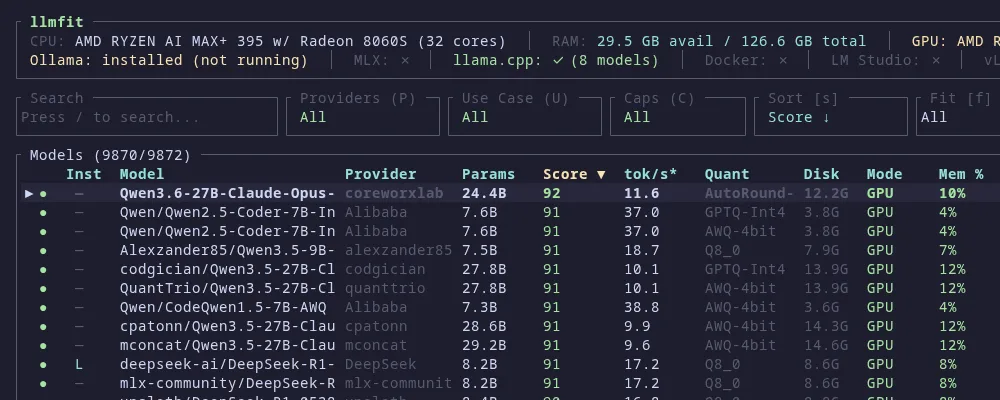
You see this screen after typing llmfit. At the top is your detected hardware, then the installed runtime providers, then the models ranked by fit score (Score), with estimated speed (tok/s), the chosen quantization (Quant) and memory use (Mem %). The screenshot is from the project's official demo.
Hardware detection
Reads your RAM, CPU and graphics card specs straight from the system and bases every recommendation on what the machine can actually do.
Speed estimates
Estimates generation speed by modelling memory bandwidth, then refines it with samples taken while running and real measurements shared by the community.
Multi-GPU and MoE
Handles multi-GPU setups and mixture-of-experts (MoE) models, accounting for how they use memory.
Quantization choice
Picks the quantization level that balances quality against the memory you have, for each model separately.
Works with your tools: supports the local runtimes Ollama, llama.cpp, MLX, Docker Model Runner and LM Studio.
Install: pick one method
Ready-made binaries through package managers, a quick install script, a Python package, containers, or a build from source.
# Windows (WinGet)
winget install --exact --id AlexsJones.llmfit

# Windows (Scoop)
scoop install llmfit

# macOS / Linux (Homebrew)
brew install AlexsJones/llmfit/llmfit

# macOS (MacPorts)
port install llmfit# Quick install script
curl -fsSL https://llmfit.axjns.dev/install.sh | sh
# Without sudo (installs to your user folder):
curl -fsSL https://llmfit.axjns.dev/install.sh | sh -s -- --local
# Python (uv)
uv tool install -U llmfit
uvx llmfit # run directly without installing# Docker / Podman
docker run ghcr.io/alexsjones/llmfit
docker run --rm -it ghcr.io/alexsjones/llmfit --tui
# Build from source (requires Rust)
git clone https://github.com/AlexsJones/llmfit.git
cd llmfit && cargo build --release
# Binary: target/release/llmfitTrust: Windows binaries are code-signed through SignPath.io. Signing is guaranteed from v1.1.19 onward, so check the signature if you use an older release.
The commands you will actually use
Plain llmfit opens the interactive interface. Each subcommand also runs on its own for scripts and automation.
Interactive interface: the default mode for exploring which models fit your hardware.
Fit table: prints the models ranked by how well they fit your current system.
Top picks: returns the recommendations as structured JSON, useful for scripts and automation.
Detailed breakdown: shows a full analysis of one model, including how its score is made up.
Real measurement: measures actual tokens per second and time to first token. Needs a model runtime already running, such as Ollama or LM Studio.
Hardware report: prints a full detection report: memory, CPU and graphics card as the tool sees them.
Web UI and API: starts a web dashboard and a REST API on default port 8787, if you prefer the browser.
Extensible: you can add custom models locally without rebuilding the tool.
The project in numbers
- About 39k stars and 2.5k forks on GitHub, with 138 releases (latest v1.1.20, November 2026).
- Written in Rust, with Python and JavaScript for supporting parts.
- MIT licence, fully open, maintained by AlexsJones.
- Community benchmarks: users share real performance measurements that improve the estimates over time.
Start in 4 steps
llmfit doctor and check that it reads your hardware correctly.llmfit fit or the interactive interface.llmfit bench after starting the model in Ollama or LM Studio, before you rely on it for work.Sources: the README and releases page at github.com/AlexsJones/llmfit (MIT licence). This guide is independent and not affiliated with the llmfit project. Checked November 2026.
Want your team to use this at work?
I'm Abdulaziz Alshamsi, a certified AI trainer and consultant in Abu Dhabi. I train government and company teams to use AI in their daily work. Message me to discuss a session for your team.