

Install the Dream Interpretation Skill
Add one ZIP file to Claude or ChatGPT so it interprets dreams from live, cited web sources instead of memory. About 10 minutes, no coding.
A skill called researching-dream-interpretations installed in your Claude or ChatGPT account. When you ask about a dream, it searches the web first, prefers hellooha.com (موقع حلوها), cites every source next to the claim, and labels the result as a traditional interpretation, not a prediction.
Before you start, you need:
Download not starting? Open this page in Safari or Chrome.
What the skill does
Its core rule: no dream interpretation from the model's memory alone. For every request it:
- Picks out only the details you gave (symbol, colour, action, feeling) and never invents missing ones.
- Searches the web for each symbol, starting with hellooha.com, then opens and reads the pages instead of trusting search snippets.
- Uses the official Ibn Baz site or IslamWeb only when you ask for an Islamic framing, and sleep or medical sources only when you ask for a scientific view.
- Answers in your language under five headings: Summary, What the sources say, Synthesis, Confidence, Sources.
Read the answer for what it is. Dream interpretation is a traditional practice, not a way to predict events, and the skill says so in every answer. It will not present a dream as proof that death, illness, divorce or loss will happen, and it will not advise a major decision because of a dream.
Before you upload
- Keep the ZIP as it is. Do not unzip, rename or re-zip it. Claude rejects a skill whose folder name does not match the skill name, and this ZIP already matches.
- Look inside if you like. Open the ZIP on your computer and read
SKILL.md: it is plain text instructions, with no scripts. - Keep dreams private. Leave out other people's names and personal health or family details when you describe a dream.
Install it in Claude
- Turn on code execution, which skills need: Settings > Capabilities > Code execution and file creation. In the newer Settings layout it is called Create and edit files.
- Open Customize > Skills.
- Click +, then + Create skill, then Upload a skill.
- Choose
researching-dream-interpretations.zip. - Check that the skill appears in your list with its switch turned on. A skill that is switched off is not available to Claude.
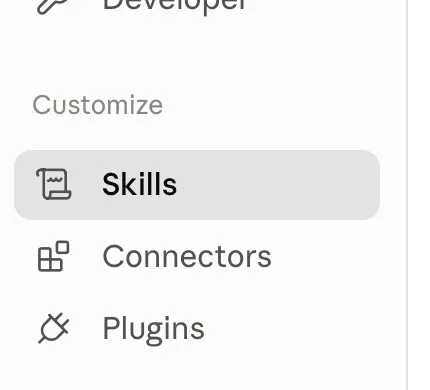
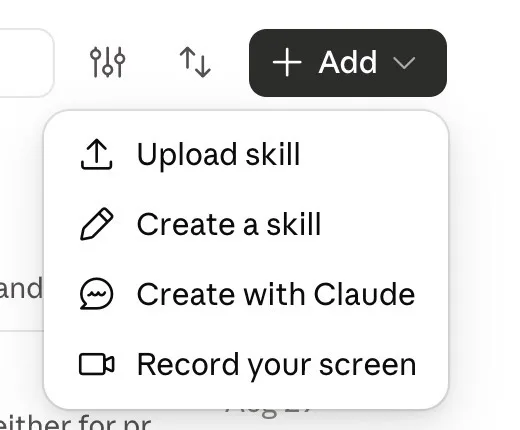
Your screen may show an Add button with Upload skill instead of the + menu. Both lead to the same upload.
Team or Enterprise account? An owner has to allow code execution and Skills first, in Organization settings > Plugins & skills on the Policy tab. If you cannot find the upload option, ask your workspace owner.
Install it in ChatGPT
Skills in ChatGPT are for eligible Business, Enterprise, Healthcare and Edu workspaces, depending on what your admin allows.
- In the sidebar, select Plugins, then the Skills tab.
- Select Create, then Upload from your computer.
- Choose
researching-dream-interpretations.zip. - Wait for the scan. Most skills are ready right after it. If the skill shows Needs Review, open it and review the details before using it.
- Confirm it is listed under Installed on the Skills page.
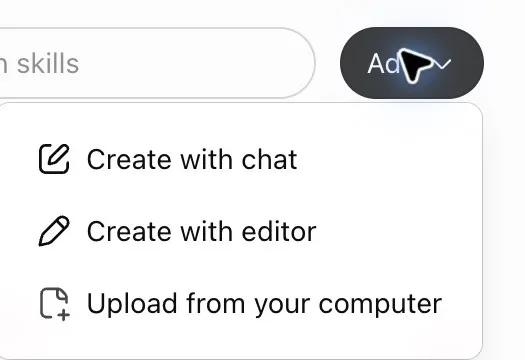
On some screens the button reads Add instead of Create; the menu is the same.
No upload option? Your admin may not have turned on skill uploading for your role. Ask them, or install the skill in Claude instead.
Make sure web search is on
Claude
In a chat, click + at the lower left and select Web search until a checkmark appears. In the newer Claude experience there is no toggle: Claude searches when it helps. On Team or Enterprise, an owner enables it in Organization settings > Capabilities.
ChatGPT
ChatGPT may search on its own. To force it, select View all tools > Search, or type / in the message box and choose Search. In a managed workspace, ask your admin if search is missing.
Test it in a new chat
Open a new chat and paste one of these. The skill starts on its own when you ask about a dream. To call it by name, write "Use the researching-dream-interpretations skill" in Claude, or type @ and pick it in ChatGPT. The Arabic prompts stay in Arabic because the skill answers in the language you write in.
1 · A calm first test
حلمت أني أمشي في بيت قديم وشعرت بالهدوء. فسّر حلمي.2 · One symbol with a detail
فسر حلمي: حلمت أن أسناني الأمامية صفراء جدًا.3 · Gulf dialect, with conditions
حلمت أن سن أمامي طاح في يدي بدون دم، شو تفسيره؟4 · Sources only, no memory
حلمت بثعبان أسود يلاحقني. استخدم مصادر موثوقة ولا تعتمد على معلوماتك الداخلية.5 · English, traditional and scientific views
I keep dreaming that my teeth fall out. Give me the traditional Arabic interpretation and separately the scientific context.If the answer has no links to sources, the skill did not run or search was off. Go back to step 5, start a new chat, and name the skill in your message.
Sources: Anthropic, Use skills in Claude and Enable and use web search (support.claude.com); OpenAI, Skills in ChatGPT and Searching the web with ChatGPT (help.openai.com); OpenAI, Build skills (learn.chatgpt.com); the skill's own SKILL.md and README, version 1.0.0. Checked November 2026.
Want your team to use this at work?
I'm Abdulaziz Alshamsi, a certified AI trainer and consultant in Abu Dhabi. I train government and company teams to use AI in their daily work. Message me to discuss a session for your team.