


Set Up Your Brand in Claude Design
Prepare your logo, colors and fonts, turn them into a design system in Claude, and every new design, deck and carousel starts in your brand. For beginners on a paid Claude plan.
Your identity makes the difference. When you give Claude your files and clear rules, it has a reference to return to in every design. The result is more consistent and easier to edit.
Before you start, you need:
What is a design system?
It is your brand files plus the rules for using them: when to use each color, which font is for headings, how much space goes between elements, and how a page is laid out. The logo and colors are the start; the rules turn them into a system Claude can repeat.
It pays off in every format: in a document, readable headings and text; in a presentation, one clear idea per slide; in a carousel, a visual sequence and an identity your followers recognise. The layout changes with the size, the identity stays the same. The system helps with beauty and consistency, but it still needs good content and a visual review.
Prepare your brand files
- Colors: try palettes in Coolors (press the space bar to generate a new one). Save the HEX codes and choose a primary color, an accent color, a background and a text color. Matching colors are not enough on their own: check that text stays readable with the free Coolors Contrast Checker.
- Fonts: download the font files from their source, such as Google Fonts. Get the weights you need and pick one font for headings and one for body text, in Arabic and English. Upload the files themselves: Claude cannot use a font that is only named. Most Google Fonts families use the SIL Open Font License, but check each family's license.
- Logo: work with a professional designer, or start by generating an idea with ChatGPT or Gemini. Check that the name is spelled correctly and that the logo stays clear at a small size. Prepare a transparent PNG and a vector file if you have one.
- Pattern (optional): you can pick one from Hero Patterns and set its colors and opacity. Decide where it is used. Hero Patterns is licensed CC BY 4.0, so credit the creator as the license requires.
- Design rules: write down heading sizes, spacing, margins, image and icon style, and how cards and tables look.
- Real examples: add a few finished designs, decks or screenshots that show your brand in use. They teach Claude more than a guidelines PDF alone.
Create the design system in Claude
Claude Design now works inside any Claude conversation at claude.ai. Labels may move as the interface updates.
- In the message box, open the + menu, choose Design system, then New design system.
- Choose Using Claude. An empty design system opens beside a new conversation. (Using Claude Code is the other route, for a design system that already exists in a code repository.)
- Under "Not sure where to start?", choose Upload brand files.
- Add your logo, fonts, pattern, color file, brand rules and example designs, then choose Create design system.
- Claude reads the files and writes a short first draft, then asks whether to take it further. Answer in the conversation with the prompt in step 4.
You can also start from Settings > Design systems and choose New design system.
Prompt to build the full system
Replace the text in square brackets with your details, then send it in the conversation beside your design system. Describe your brand in the first lines: what it offers, who it serves and its personality. Example: "An education brand that makes technology simple for beginners, clear, friendly and practical, in Arabic and English."
Design system prompt
Create a cohesive design system for my brand using the attached assets and the brand description as the source of truth.

BRAND INPUTS
Name: [brand name]
Audience: [who I serve]
Purpose and personality: [what I do and 3 descriptive words]
Languages: [Arabic RTL / English LTR]
Approved colors and roles: [HEX codes and their uses]
Fonts and roles: [attached font names, headings / body]
Logo and pattern: [attached files and usage rules]

IDENTITY
Preserve my supplied logo exactly. Use my uploaded fonts and approved colors. If an asset is missing or cannot be used, tell me before substituting it. Suggest missing color roles separately for approval. Do not copy another brand's identity.

DESIGN RULES
Prioritize clarity, readable hierarchy, consistent alignment and generous whitespace. Define font sizes, weights and line heights for each language. Define HEX color roles, spacing, corner radii, borders, shadows, image style and a consistent icon family. Use patterns sparingly without reducing readability. Support Arabic RTL and English LTR correctly.

REUSABLE ELEMENTS
Create coordinated headings, cover layouts, text blocks, cards, callouts, tables and page numbering. For interactive components only, include default, hover, pressed, focus, disabled and loading states. Keep motion restrained and provide reduced-motion alternatives.

DELIVERABLES
Show a visual brand guide and reusable design tokens. Create coordinated examples: an A4 document page, a 16:9 presentation slide and a 1080 x 1350 social carousel slide. Adapt text density and composition to each format while preserving one recognizable identity. Also show a website section and an interactive component preview if supported.

QUALITY CHECK
Verify font loading, Arabic shaping, contrast, logo proportions, image quality, margins and text overflow. Show the actual designs, not just written recommendations. List unresolved assets or assumptions.Review the result section by section. Fix values on the page directly, or ask Claude for a specific change. You can also edit the note on a color or component to tell Claude when to use it.
Test the system before you rely on it
Start a new chat and ask for an ordinary deck without mentioning your brand. If it looks like yours, the system works. Then try the same idea as a document and a carousel, and compare fonts, colors and logo use.
Check every test design
Use the system in every new request
Before you ask for a design, look at the chip under the message box. It should show your design system's name. If it reads No design system, select yours in + > Design system. Then state the goal, the audience, the content and the size.
Example request
Use my brand design system to create an Arabic carousel of 6 slides, 1080 x 1350, about [topic] for [audience]. Give each slide one idea and a clear title, and end with one practical step. Keep my approved fonts, colors and logo.To edit or remove a system later, go to Settings > Design systems.
Built yours in standalone claude.ai/design?
The standalone site at claude.ai/design stays open until December 14, 2026. Systems made there show a Standalone tag, and Claude cannot use them in a chat until they are moved.
- Open the Artifacts page in Claude and click Move team design systems in the "Claude Design lives here now" banner.
- When the move finishes, the system's owner opens it, selects Finish setting up and sends the request to Claude.
- If a banner offers Let Claude clean it up, use it, then run the test in step 5.
Chats and comments do not move. They stay in the standalone site until it closes, so copy anything you need before December 14, 2026.
For reference, this is how the standalone flow looked. On the home page, open Design systems and click Create design system:

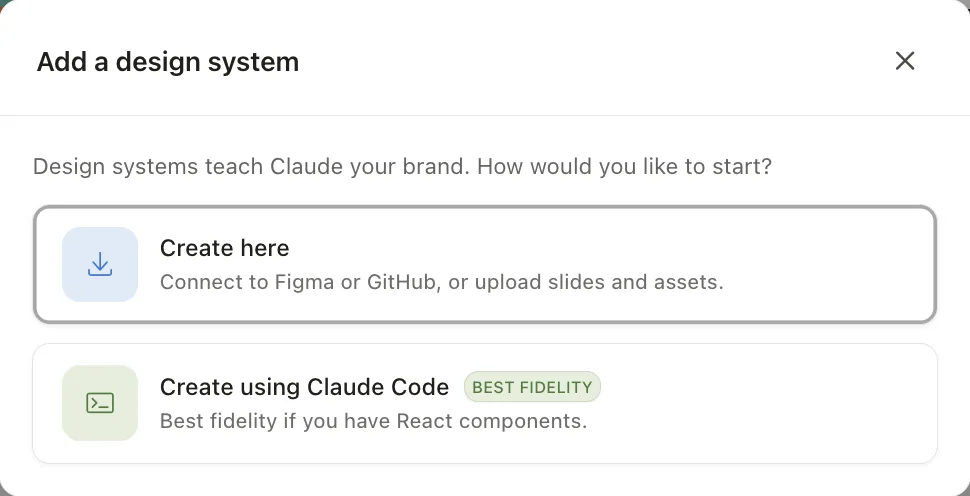
In the Add a design system window, Create here lets you upload brand files; Create using Claude Code is the route for React components:
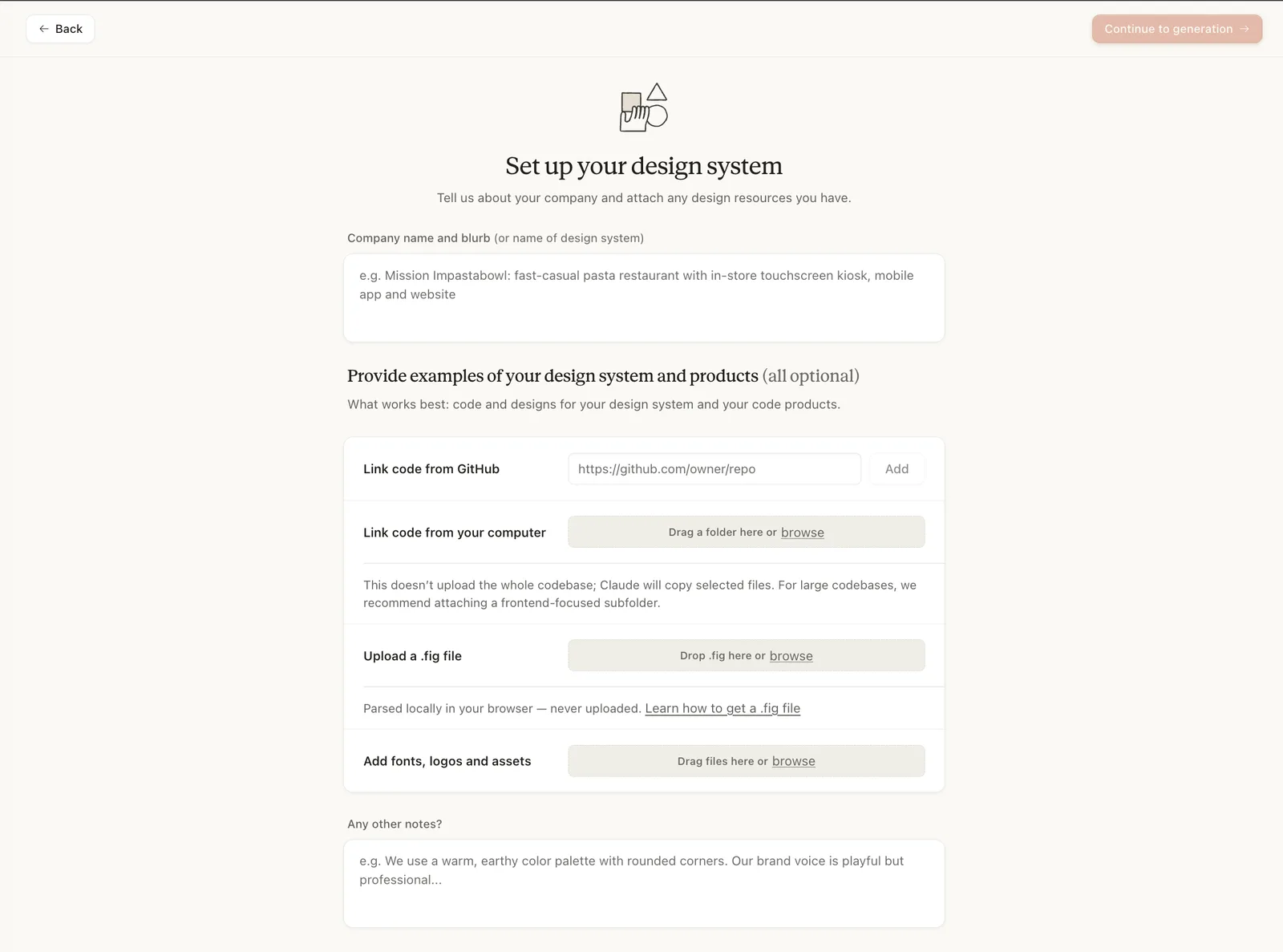
On the setup page, describe the brand in Company name and blurb, attach files in Add fonts, logos and assets, paste the prompt from step 4 into Any other notes?, then click Continue to generation:
Sources: Claude Help Center (Set up your design system in Claude Design; Get started with Claude Design; Move from standalone Claude Design to Claude), Claude Academy (Setting up a design system in Claude), claude.com/product/design, Coolors, Google Fonts repository, Hero Patterns. Screenshots: the author's own. Checked November 2026.
Want your team to use this at work?
I'm Abdulaziz Alshamsi, a certified AI trainer and consultant in Abu Dhabi. I train government and company teams to use AI in their daily work. Message me to discuss a session for your team.