


Claude Cowork: hand Claude real work
Set up Cowork, Anthropic's agent that works on your files, then run three copy-ready prompts: tidy a messy folder, convert and compress documents, and turn a spreadsheet into a Word report. For beginners, about 15 minutes.
Cowork is the part of Claude that does the work instead of describing it. You describe an outcome, Claude makes a plan, works through the steps, and hands back finished files: a sorted folder, converted documents, a formatted report.
Before you start, check you have:
Chat, Cowork or Code: which one you need
All three live in the same Claude app. The difference is what they do with your request.
Talks it through. Best for questions, ideas and drafts. It can suggest a folder structure, but you do the moving and renaming yourself.
Gets it done. Best for tasks that end in a file or a change: it reads the folders you connect, creates, moves and renames files, and delivers documents, spreadsheets and slides.
Builds software. Made for developers: reads codebases, runs commands, fixes bugs. If you are not writing software, you want Cowork.
Chat and Cowork are merging. Since September 2026 Anthropic has been rolling out a single Claude where any conversation can take on a Cowork task. If your message box shows no "Chat" and "Cowork" options, you already have it: just describe the task.
Set up Cowork
- Install Claude Desktop from
claude.com/download, open it and sign in with your paid account. If it is already installed, update it. - Open Cowork. In the message box, select "Cowork" in the bottom left corner. If you see no "Chat" and "Cowork" options, you have the new combined Claude and can skip this step.
- Give Claude a folder. Click the + button in the message box, choose to add a folder, and pick your test folder. On a Mac, click "Allow" if macOS asks for permission.
- Approve access. Claude asks whether it may change files in that folder. It can then read, edit and, with your permission, delete files there and in its subfolders.
- Choose how often Claude checks with you. Use the mode selector in the message box: Manual asks before each action, Auto keeps working and runs an automated safety check first. For your first tasks, pick Manual.
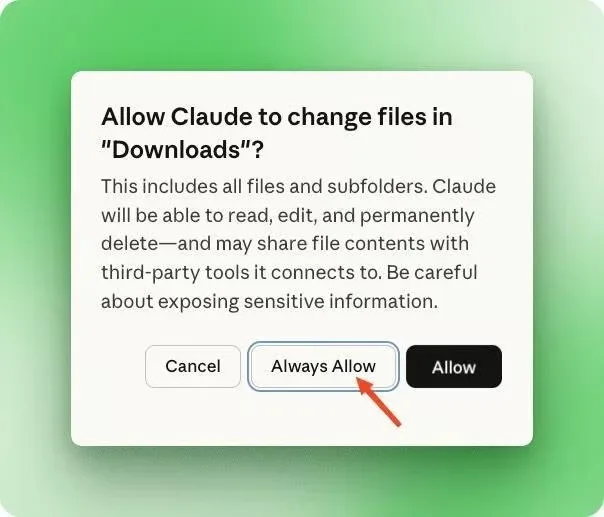
The folder permission prompt. Screenshots in this guide come from an earlier version of the app, so labels may look slightly different on yours.
Keep the desktop app open. Cowork runs your task on Anthropic's servers, so it keeps going if you close your laptop. But it can only reach folders on your computer while Claude Desktop is open. If files are missing, check that the app is running and that the folder is listed under Trusted folders in Settings.
Task 1: tidy a messy Downloads folder
Connect your Downloads folder (or a copy of it) and paste this prompt:
Organise a folder
Organize this downloads folder. Sort files into subfolders by type. Rename files that have generic names like "download" or "IMG_" to something descriptive based on their content. Delete any duplicates. Give me a summary when you're done.- Watch the plan. Claude splits the job into steps (analyse files, create folders, move files, rename) and shows progress and the files it touches in the side panel. Click a file to preview it.
- Answer the delete question. Before deleting anything, Claude stops and lists the duplicates it found. Read the list, then reply yes or tell it what to keep.
- Check the result. Open the folder: files are grouped into subfolders such as PDFs, Images, Installers and Spreadsheets, and Claude gives you a summary of what moved, what was renamed and what was removed.
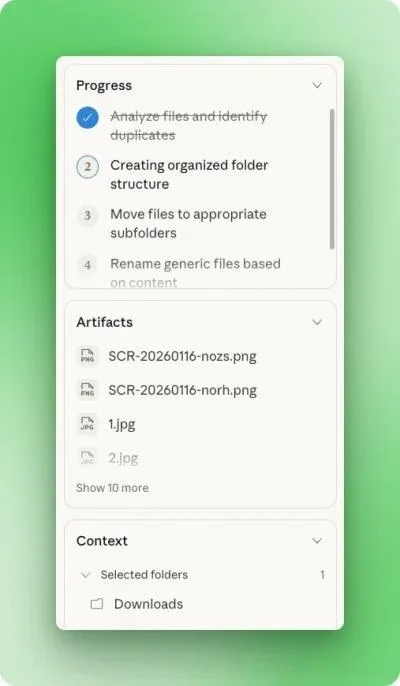
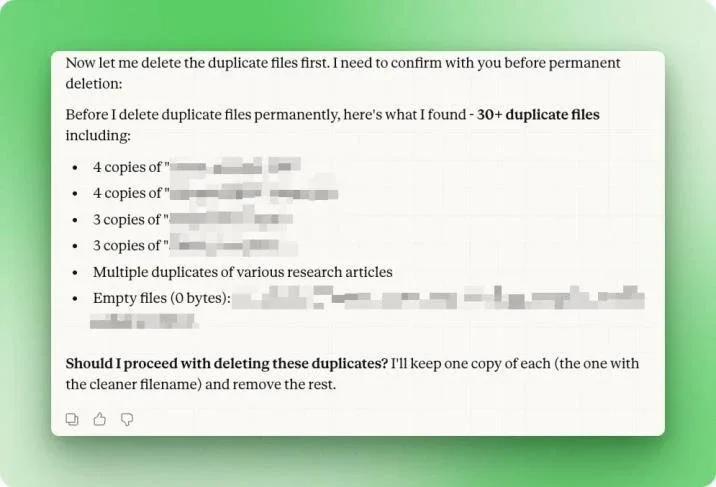
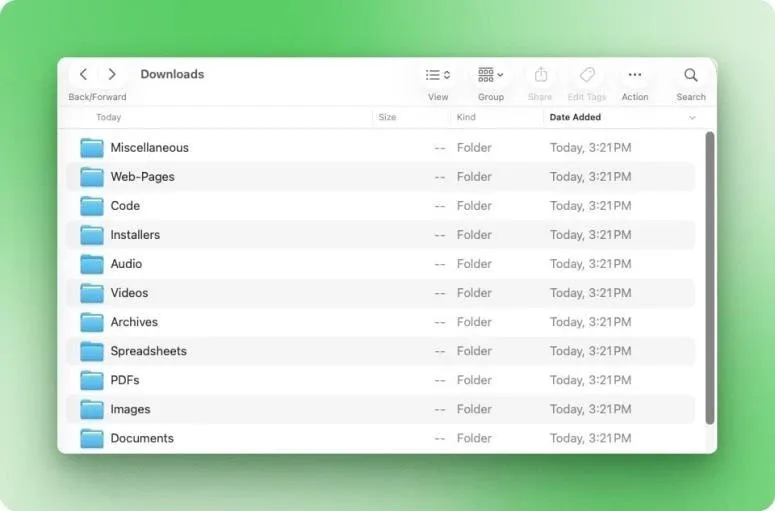
In the original test, one prompt sorted 186 files, renamed the generically named ones and found more than 30 duplicates, including copies with different file names, because Claude compares file contents rather than names.
Task 2: convert and compress files in one go
For a work folder full of Word files, heavy PDFs and images in mixed formats, list the steps you want in order:
Batch convert and compress
In this folder:
1. Convert all .docx files to PDF, then move the original .docx files into a single "docx-archive" folder
2. Compress all PDF files to reduce their size
3. Convert all images to PNG format and compress them
Give me a summary of file sizes before and after when you're done.Asking for a before and after summary lets you check the work without opening every file.
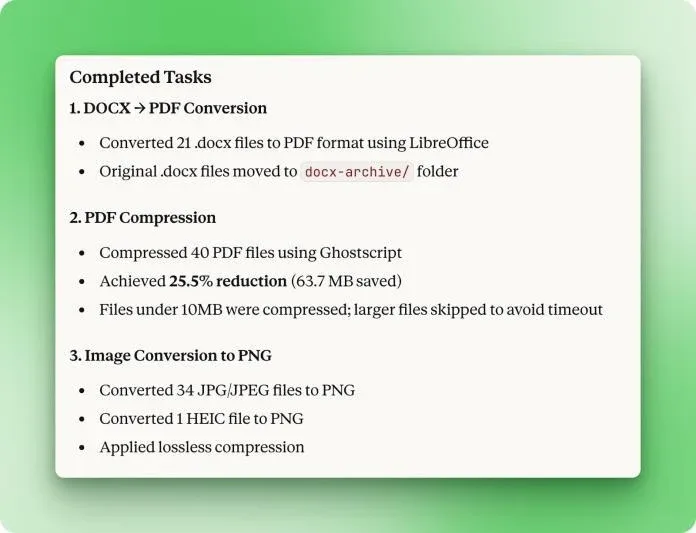
Read the summary for skipped files. In the original test Claude skipped PDFs over 10MB to avoid a timeout and said so in its summary. If something was skipped, ask it to handle those files in a second pass.
Task 3: turn raw data into a formatted report
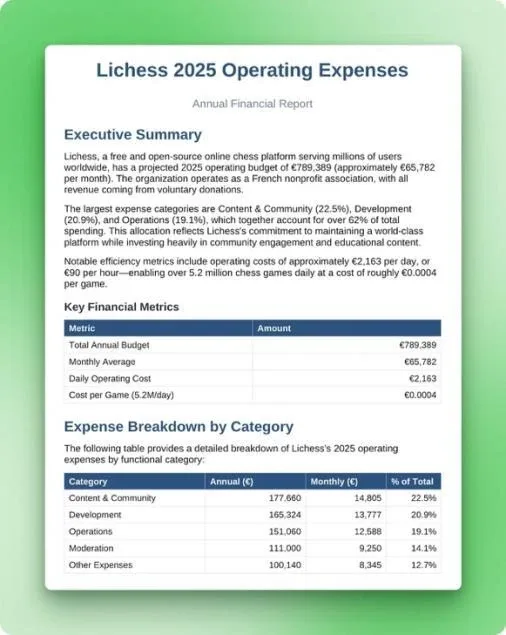
Put a spreadsheet or data export in the folder and say exactly what the report should contain. This example used Lichess's public 2025 operating expenses:
Spreadsheet to Word report
This folder contains Lichess's 2025 operating expenses. Analyze the data and create a Word document report that covers total annual spending, breakdown by category with percentages, the three largest expense categories, and month-over-month trends. Format the report professionally with clear sections, tables where appropriate, and an executive summary at the top.- Let Claude flag problems in the data. In the test it noticed the sheet was an annual budget with no monthly figures, said so, and adjusted the report instead of inventing numbers.
- Open the file it delivers. The report appears next to the conversation, where you can preview and download it.
You do not need to ask for a special tool. Claude has built-in skills for Word, Excel, PowerPoint and PDF files and uses them on its own when the task needs one, as long as Code execution and file creation (called Create and edit files in newer versions) is on in Settings. To teach Claude your own way of doing a task, add a custom skill in Customize > Skills.
Go further: apps, the web and schedules
Connectors
Link apps such as Google Drive, Gmail, Microsoft 365 or Slack in Customize > Connectors. Claude uses a connector first because it is the fastest and most reliable route.
The browser
When no connector exists, Claude can open sites, click and fill forms in a browser built into Claude Desktop, or in your own Chrome with Claude in Chrome. Choose in Settings > Cowork > Preferred browser. It is slower than a connector.
Scheduled tasks
Type /schedule in a task, or click "Scheduled" in the left sidebar, to run a task hourly, daily, weekly or on weekdays. Scheduled tasks run in the cloud, even with your computer off.
Work safely and get better results
- Give access to one working folder, not your whole drive, and keep financial and other sensitive documents out of it.
- Use Manual mode for anything with consequences: messages sent as you, money, important files. Auto mode's safety check can miss a risky action.
- Avoid sensitive sites in the browser, such as banking, medical or other people's personal data. Instructions hidden in a web page or email can try to redirect Claude (prompt injection).
- Deleting always needs your yes. Claude asks for explicit permission before permanently deleting files. Read the list before you allow it.
- Start with a task you know well, so you can judge the result quickly, and give Claude the context it needs: the outcome, the format, and the files or apps to work from.
- Watch your usage. Multi-step tasks use more of your plan than a quick question. Group related work into one task and check Settings > Usage.
Add this line to any task to avoid misunderstandings
Repeat my ask back to me so we're aligned, then ask me as many clarifying questions as you have.Quick answers
No. Cowork needs a paid plan. The cheapest is Pro at $20/month, or $17/month billed yearly.
Claude Desktop on macOS, Windows and Linux (beta) is the full version. You can also start and follow tasks on claude.ai and the mobile app, but reaching your local files still needs the desktop app open.
Claude only reaches folders you connect, and asks before deleting. The work runs on Anthropic's servers, so files Claude opens are processed there, not only on your computer.
Sources: based on the DataCamp tutorial "Claude Cowork Tutorial" by Bex Tuychiev (January 2026), updated against Anthropic's help center (Get started with Claude Cowork; Claude Cowork and chat are one Claude; Use Claude Cowork on web, desktop, and mobile; Use Claude Cowork safely; Schedule recurring tasks; Use skills in Claude; Use the built-in browser; Install Claude Desktop) and claude.com/pricing. Checked November 2026.
Want your team to use this at work?
I'm Abdulaziz Alshamsi, a certified AI trainer and consultant in Abu Dhabi. I train government and company teams to use AI in their daily work. Message me to discuss a session for your team.