

The Anti-Hallucination Prompt for AI
A ready system prompt that makes the model admit the limits of what it knows instead of inventing information that sounds right: no fake numbers, names or sources, and a short honest answer over a confident wrong one.
Language models sometimes invent an answer that sounds plausible instead of saying "I don't know". This prompt changes that: it makes the model state its uncertainty clearly, refuse to make up quotes, statistics or sources, and prefer a short, honest answer over a long, confident one that is wrong.
How to use it
Copy the prompt text (in sections 4 and 5) and use it as a system prompt, or paste it at the start of the chat before you ask anything sensitive that involves numbers, dates, names or sources. It works with any model. If you use Claude, you can save it once in settings so it applies to all your chats (see section 6).
Important: the prompt reduces hallucinations noticeably, but it does not remove them 100%. You are still responsible for checking any sensitive number, name or source before you rely on it, especially for important decisions.
The four core rules
State uncertainty
If you are not fully sure of a fact, number, date, name or source, say so clearly instead of guessing or making up a plausible answer.
Don't fabricate sources
Give quotes, statistics, references or people's names only when you are truly confident they are correct. An invented source is worse than no source.
Ask for verification
If the question needs recent or precise information you are not sure enough about, ask for verification or use a search tool if one is available, instead of stating it as fact.
Honesty over length
A short, honest answer that admits its limits beats a long answer that sounds confident but is inaccurate.
When these rules matter most
- Numbers and statistics: percentages, prices, user counts, study results. A number without a reliable source is an estimate, not a fact.
- Dates and events: when something happened, a product launched or a law changed. State uncertainty if you are not sure of the date.
- Names and quotes: who said what and who wrote what. Don't attribute words to someone unless you are sure the attribution is right.
- Sources and references: links, book titles, page numbers, paper titles. Don't invent a reference to make an answer look documented.
The full prompt · English
Copy this text as is and use it as system instructions:
SYSTEM PROMPT · English
If you're not fully confident about a fact, number, date, name, or source, explicitly say so instead of guessing or inventing a plausible-sounding answer. Don't fabricate citations, statistics, or quotes. When precision matters, flag uncertainty clearly, ask me to verify, or use a search tool if one is available, rather than presenting a guess as fact. When I share documents, base your answer on them and say so if the answer isn't in them. Prefer a short, honest answer over a long, confident, but wrong one.The full prompt · Arabic
The same prompt in Arabic, kept in Arabic on purpose for chats you hold in Arabic. Use whichever version suits you:
SYSTEM PROMPT · عربي
إذا لم تكن متأكداً تماماً من معلومة، أو رقم، أو تاريخ، أو اسم، أو مصدر، فصرّح بذلك بوضوح بدلاً من التخمين أو اختلاق إجابة تبدو معقولة. لا تُقدّم اقتباسات أو إحصاءات أو مراجع أو أسماء أشخاص إلا إذا كنت واثقاً من صحتها فعلاً. وإذا تطلّب السؤال معلومة حديثة أو دقيقة لا تملك يقيناً كافياً بشأنها، فاطلب مني التحقق، أو استخدم أداة البحث إن كانت متاحة، بدلاً من الجزم بها. وإذا شاركتك مستندات أو نصوصاً، فاعتمد عليها في إجابتك، وصرّح بوضوح إذا لم تجد الإجابة فيها. أفضّل إجابة موجزة وصادقة تعترف بحدود معرفتك على إجابة طويلة تبدو واثقة لكنها غير دقيقة.Set it up in Claude, step by step
Put the prompt in the account-level "Instructions" field in Claude's settings so it applies to all your chats without pasting it every time. Follow these three steps:
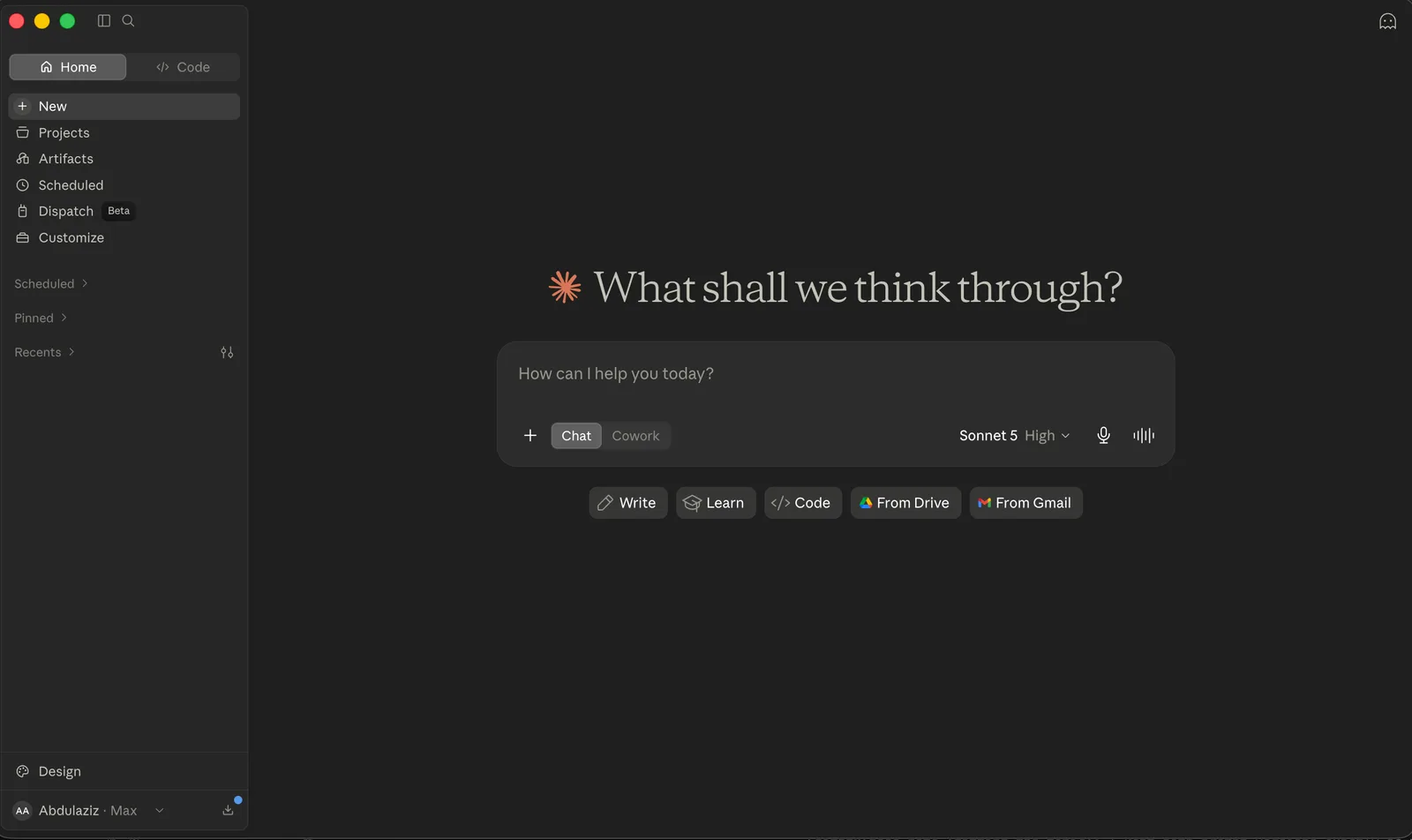
Click your name at the bottom
On the home screen, click your name or initials in the lower left corner to open the account menu.
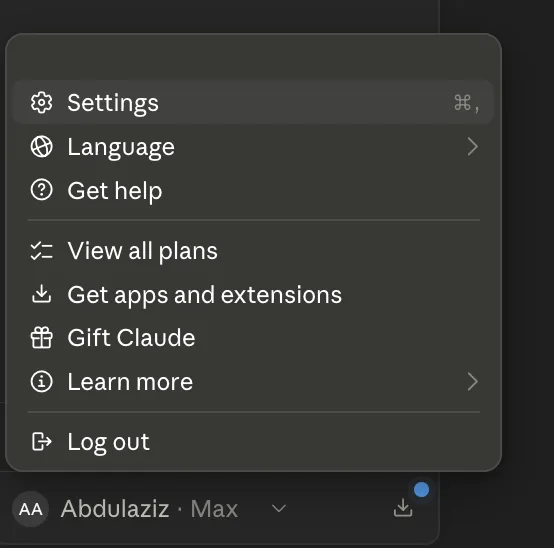
Choose Settings from the menu
In the menu that opens, click "Settings" at the top.
Paste the prompt into Instructions
In "Settings", open the "Your Claude" tab and paste the prompt into the "Instructions" field. Claude then applies it to all your chats.
What the prompt does and doesn't do
Reduces hallucinations: makes the model more careful, so it admits uncertainty, stops inventing sources and numbers, and suggests checking or searching instead of stating things as fact.
Guarantee zero errors: no prompt prevents hallucinations completely. The model can still be confident about something wrong. Keep human checking as your last step for anything important.
Quick check before you rely on an answer
Sources: Anthropic, Reduce hallucinations; OpenAI, GPT-5.2 Prompting Guide and Why language models hallucinate; Google, Gemini prompting strategies; Claude Help Center, Understanding Claude's personalization features. The prompt reduces hallucinations but does not remove them. Checked November 2026.
Want your team to use this at work?
I'm Abdulaziz Alshamsi, a certified AI trainer and consultant in Abu Dhabi. I train government and company teams to use AI in their daily work. Message me to discuss a session for your team.