
Microsoft made Agent 365 generally available on 1 May 2026. It is a single control plane for finding, governing and securing the AI agents running across an organisation, whether Microsoft built them or not.
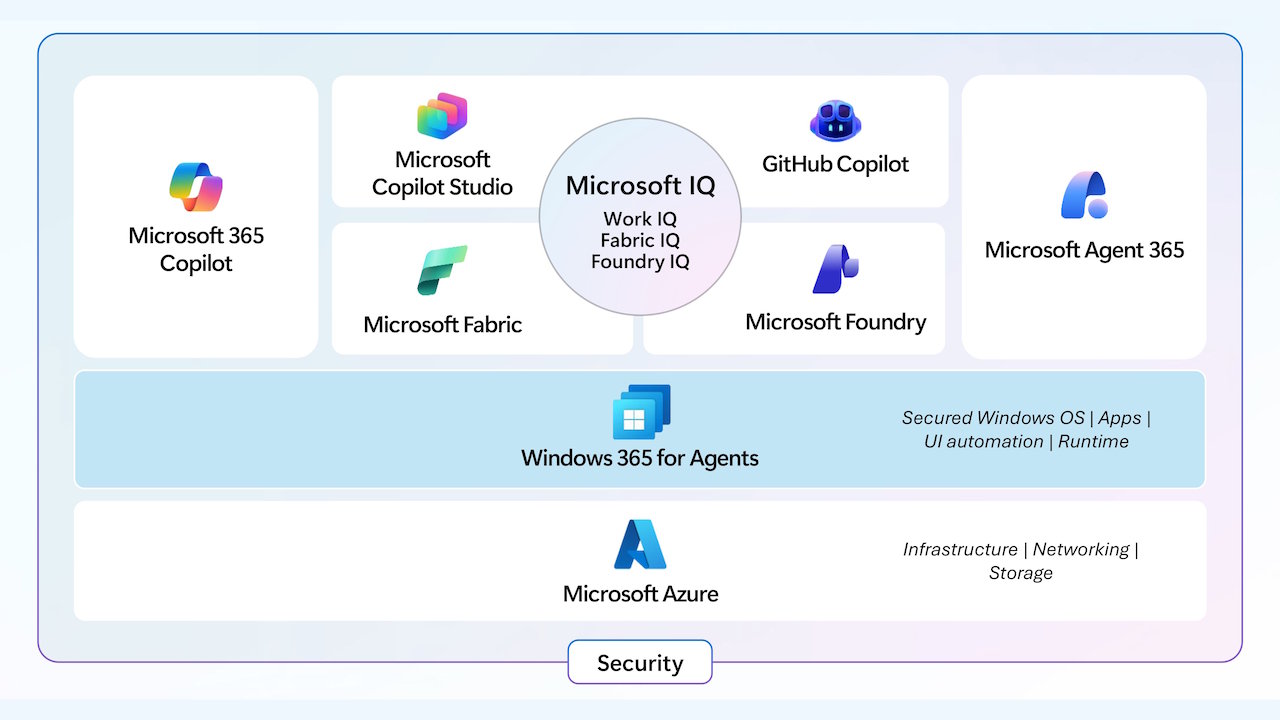
The release lands on a real gap. Research published weeks earlier found that 88% of organisations had experienced AI agent security incidents, while only 21% of executives had complete visibility into what their agents could access. Agents now run multi-step workflows, query databases, call APIs and even start other agents. Most organisations have deployed them faster than their security teams can keep track.
Microsoft groups the product into three areas: observe, govern and secure.
Seeing which agents you have
The observe side is a central dashboard showing how many agents are registered, who uses them, how that is growing, and where risk signals are appearing. Behind it sits a registry that acts as the system of record for every agent, with its owner, permissions, data access, security details and usage. A map view shows how agents relate to and depend on each other across platforms.
The most useful part for many IT teams will be shadow AI detection. Agent 365 can now find local AI agents running on Windows devices outside IT's view. At launch this covers OpenClaw, with GitHub Copilot CLI and Claude Code support coming soon. Many organisations cannot yet produce a basic list of the agents their staff run, and this gives them a starting point.
For organisations that also use other clouds, registry sync for AWS Bedrock and Google Cloud is in public preview. It supports discovery, inventory and basic lifecycle governance on those platforms.
Approving and controlling agents
From the registry, administrators can install, publish, block or delete agents and reassign their owners. They can roll an agent out to specific users, to groups, or to everyone.
An admin approval flow lets security teams review an agent's capabilities, data access, permissions and security posture before it is deployed. Management rules automate routine work, such as deploying approved Microsoft agents automatically and reassigning agents when their owner leaves.
Agent 365 also connects to the Microsoft tools many organisations already run: Entra ID Governance for identity, Purview for data lifecycle controls, and the Microsoft 365 compliance stack for eDiscovery and communication compliance. Policy templates bundle policies from these services so they can be reused. If your organisation already depends on these controls, agent governance extends them instead of creating a second system to maintain.
A tools management feature controls which MCP (Model Context Protocol) servers and resources agents can reach across the organisation. MCP is how many agents connect to outside tools, so this is where a lot of agent risk actually sits.
Security controls
The secure side works with Microsoft Defender and Intune. Conditional access applies Zero Trust rules to agent activity and evaluates in real time whether the agent's or the user's identity may be compromised. This is generally available for agents acting on a user's behalf, and in public preview for agents with their own access.
At the network level, Secure Access Service Edge (SASE) adds prompt injection protection, threat intelligence filtering and URL filtering for agent traffic. Runtime detection can block prompt attacks and tool misuse as they happen. Agent Security Posture Management looks continuously for over-privileged agents, misconfigurations and vulnerabilities, and ranks what to fix first. Data Loss Prevention now covers agent interactions too, controlling which data agents can draw on and blocking exfiltration.
Pricing
Agent 365 costs $15 per user per month on its own, or comes inside the new Microsoft 365 E7 tier at $99 per user per month. E7 is Microsoft's first new enterprise licence tier since E5 arrived in 2015. Whether the standalone option is worth it depends on how many agents you run and what governance tooling you already have.
For UAE organisations already on Microsoft 365, the value is that agent governance can sit inside the identity, data and compliance controls they have already set up for residency and regulation. Before buying, I would ask Microsoft or your partner three specific things: which of the features you need are generally available today versus in preview, how the shadow AI detection will cover the agents your staff actually use beyond OpenClaw, and what the registry can and cannot do for agents running outside Azure.
Sources: