Google just made Search significantly more powerful. Yesterday, the company rolled out Canvas in AI Mode to all US users, transforming Google Search from a question-answering tool into an interactive workspace where you can build applications, draft documents, and create functional dashboards without writing a single line of code yourself.
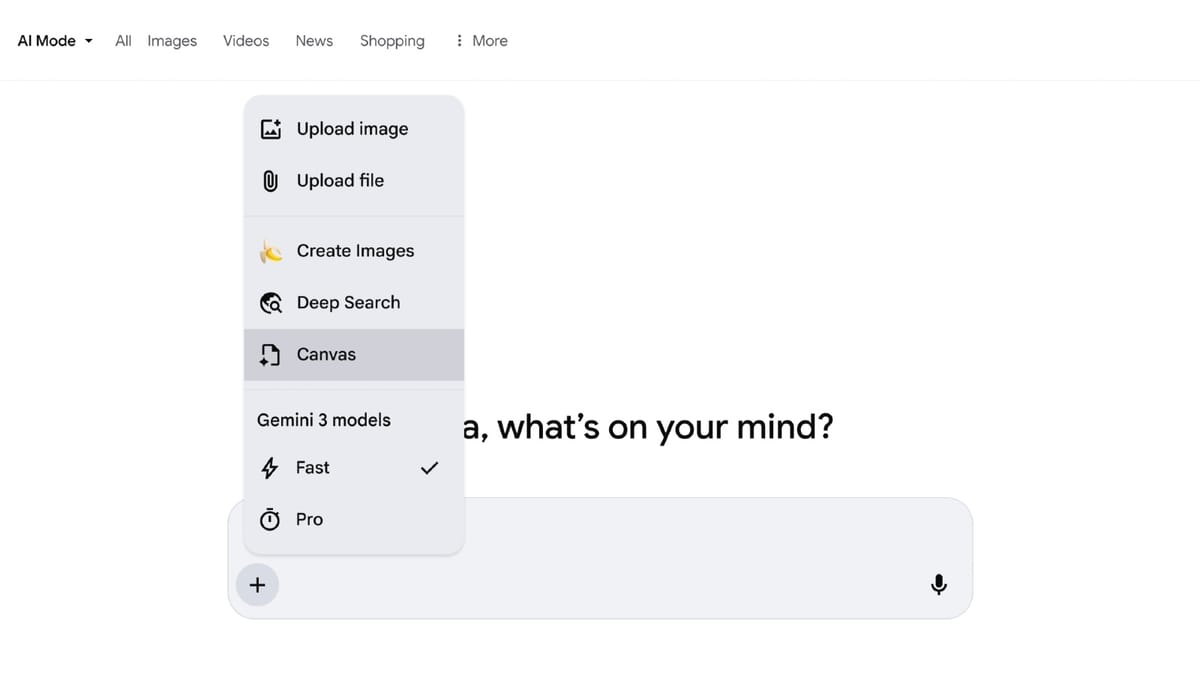
This is not a minor feature update. Canvas represents a fundamental shift in what we can expect from search engines, and it has significant implications for how AI practitioners and knowledge workers will approach their daily tasks.
What Canvas Actually Does
Canvas appears as a persistent side panel within Google Search's AI Mode. Unlike traditional search results that provide information and send you elsewhere, Canvas keeps you in the environment to actually create something with that information.
The capabilities span three core areas:
Document creation: You can draft creative content, compile research notes, or develop structured documents. The system draws from real-time web data and Google's Knowledge Graph to ground your work in factual, current information.
Code generation: Canvas can generate runnable code to spin up simple applications or games. You can view the underlying logic, test the output, and refine the behavior through conversation with Gemini. No IDE required.
Project planning: Build interactive dashboards, organize trip itineraries, or track complex projects. Google demonstrated a scholarship tracker that visualized requirements, deadlines, and dollar amounts, all generated through natural language requests.
The access method is straightforward. Users select the Canvas option from the plus (+) icon in the AI Mode tool menu, describe what they want to create, and receive an initial draft in a side panel. From there, refinement happens through conversational follow-ups until you reach the desired result.
Why This Matters for AI Workflows
For those of us building and deploying AI solutions, Canvas signals an important evolution in how foundation models will be integrated into consumer products.
The traditional chatbot interface, while useful, has limitations. It produces text responses that users must then copy elsewhere and act upon. Canvas breaks this pattern by keeping creation and refinement within the same environment. The output is not just information, it is a usable artifact.
This design pattern will likely spread. We can expect other AI products to move beyond conversational responses toward integrated workspaces that produce actionable outputs. For organizations evaluating AI tools, this raises new criteria: not just "how good are the answers" but "how easily can users turn those answers into something they can use."
From a technical standpoint, the combination of real-time web search, structured knowledge graphs, and code generation in a single interface demonstrates sophisticated orchestration. Canvas is not just calling an LLM. It is coordinating multiple data sources and capabilities to produce contextually appropriate outputs. This is the kind of agentic architecture that many of us have been building manually, now packaged into a consumer product.
Practical Applications Worth Exploring
The scholarship dashboard example that Google showcased illustrates the practical potential. Here are other use cases where Canvas could provide significant value:
Rapid prototyping: Need to demonstrate a concept to stakeholders? Canvas can generate a working prototype from a natural language description. This is not production code, but it is often enough to validate ideas before investing in full development.
Research synthesis: For academics and analysts, Canvas can pull information from multiple sources and organize it into structured documents. The Knowledge Graph integration helps ensure factual accuracy, though verification remains essential.
Learning projects: Students and professionals learning new skills can build interactive study materials, generate practice applications, or create visualizations that reinforce concepts.
Client-facing deliverables: Quick dashboards, summary documents, or interactive presentations can be drafted in Canvas and refined through iteration. The time savings for routine deliverables could be substantial.
Limitations to Keep in Mind
Canvas is currently limited to US users in English, which restricts its immediate utility for those of us working in the Middle East. However, Google typically expands successful features globally, so broader availability should follow.
The code generation capabilities, while impressive for prototyping, are not suitable for production applications. Security, performance, and maintainability require professional engineering that Canvas cannot provide.
There is also the question of data handling. When Canvas pulls from web sources and Knowledge Graph, users should be mindful of what information they are incorporating and whether it requires verification for their specific use case.
What Comes Next
Canvas in AI Mode represents Google's vision for the next phase of search: less about retrieving information, more about helping users accomplish tasks. This aligns with the broader industry trend toward agentic AI, systems that do not just answer questions but take actions on behalf of users.
For AI practitioners, the lesson is clear. The value proposition is shifting from "providing information" to "creating value directly." Our products and solutions need to evolve accordingly. Users will increasingly expect AI tools that produce usable outputs, not just accurate responses.
The competitive implications are also worth noting. Microsoft has been integrating similar capabilities into Copilot, and OpenAI continues expanding ChatGPT's canvas-style editing features. The workspace paradigm is becoming standard, and practitioners should plan for this being the expected interface pattern going forward.
As Canvas expands to more regions and languages, I expect we will see it integrated into enterprise workflows, education platforms, and specialized industry applications. The foundation is laid for search to become not just a starting point for work, but the place where work actually happens.