Anthropic just made a significant move into enterprise productivity software. On April 10, 2026, the company launched Claude for Word in public beta, bringing its AI assistant directly into Microsoft Word as a native sidebar add-in. This completes a trilogy of Office integrations that started with Claude for Excel last October and Claude for PowerPoint in February.
What Claude for Word Actually Does
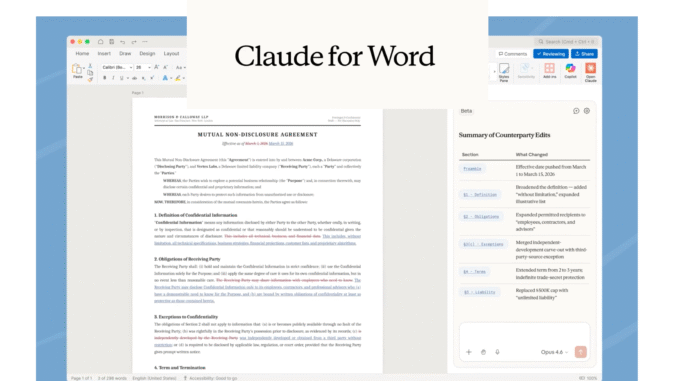
The integration works as a persistent sidebar within Microsoft Word, allowing users to draft, edit, and revise documents without switching between applications. What sets this apart from basic chat interfaces is the level of document awareness. Claude reads complex multi-section documents, processes comment threads, and edits specific clauses while preserving your formatting, numbering, and defined styles.
For those of us working on lengthy technical documents or legal agreements, this matters considerably. The tool supports tracked changes mode, meaning you can review every AI-suggested edit before accepting it. This is not about generating content in isolation and pasting it back. The model understands the document structure you are working within.
Key capabilities include:
- Semantic navigation: Finding and modifying specific sections based on meaning, not just keywords
- Template population: Filling structured documents with contextual information
- Comment-driven editing: Processing reviewer feedback as actionable tracked changes
- Model selection: Toggle between Sonnet 4.6 for faster responses and Opus 4.6 for complex reasoning tasks
Cross-Application Context Sharing
Perhaps the most compelling feature is how Claude for Word connects with Claude for Excel and Claude for PowerPoint. A single conversation thread can span all three open documents simultaneously. You can check for data inconsistencies between a Word report and its accompanying Excel model, or align narrative language in a Word file with slide content in PowerPoint.
This addresses a real pain point in enterprise work. Financial memos reference spreadsheet data. Technical proposals pull from multiple source documents. Having the AI maintain context across applications eliminates the manual reconciliation that currently consumes hours of professional time.
The Legal Tech Play
Anthropic is clearly targeting legal professionals with this release. The company highlighted several example use cases that speak directly to contract review workflows:
- Summarizing key commercial terms including parties, term, governing law, and off-market provisions
- Flagging non-standard clauses ranked by severity
- Modifying indemnification language with fallback positions
- Identifying counterparty modifications and potential dealbreakers
The tool recognizes document patterns including multi-level legal numbering, defined terms, cross-references, and standard contract structures. For law firms and in-house legal teams that spend substantial time on document review, this could meaningfully accelerate routine work.
Availability and Limitations
Claude for Word is currently available to Team and Enterprise plan subscribers on both Mac and Windows. If you want Claude in your Word sidebar, you are paying at least $25 per seat per month for the Team plan.
Anthropic has been explicit about the limitations. The feature remains in beta and is not recommended for final client deliverables, litigation filings, or documents containing highly sensitive information without human verification. The company also flagged prompt injection risks from externally sourced documents, acknowledging that AI-edited legal text requires careful review.
This measured approach is appropriate. Anyone deploying AI tools for high-stakes documents should maintain human oversight. The value proposition is accelerating the drafting and review process, not eliminating professional judgment.
Competition with Microsoft
This launch challenges Microsoft on its own turf. While Microsoft has Copilot integrated across Office 365, Anthropic is offering an alternative that lets organizations choose their AI provider. For companies already using Claude for other applications, or those who prefer Anthropic's approach to safety and capabilities, this provides a unified experience.
The timing is notable. Microsoft shares have declined significantly this year, and there is growing enterprise interest in AI tools beyond the default options bundled with existing software. Anthropic is positioning Claude as a serious productivity suite companion, not just a standalone chat interface.
Implications for Enterprise AI Adoption
For AI practitioners in the UAE and Middle East, this release signals an important trend. Enterprise AI is moving from experimental deployments to embedded workflow tools. The integration pattern matters: sidebar interfaces that preserve existing workflows, tracked changes for auditability, and cross-application context for complex tasks.
Organizations evaluating AI productivity tools should watch how Claude for Word performs in production environments. The combination of document awareness, formatting preservation, and multi-application context represents the direction enterprise AI is heading. Whether you adopt this specific tool or not, these are the capabilities your teams will increasingly expect.