


تصوير منتجك يبدأ قبل صياغة البرومبت
حوّل صورة منتجك الملتقطة بالهاتف إلى مشهد إعلاني بالذكاء الاصطناعي في ChatGPT أو Gemini. جهّز المنتج، وحدّد الأجواء التي تريدها، ثم الصق البرومبت الجاهز. نطبّق الخطوات على عبوة عصير.
صورة واحدة جاهزة للإعلان تعرض منتجك الحقيقي في مشهد جديد. أنشئها في ChatGPT أو Gemini، ثم قارنها بالصورة الأصلية تفصيلاً تفصيلاً للتأكد من مطابقة الملصق والشعار والشكل لمنتجك.
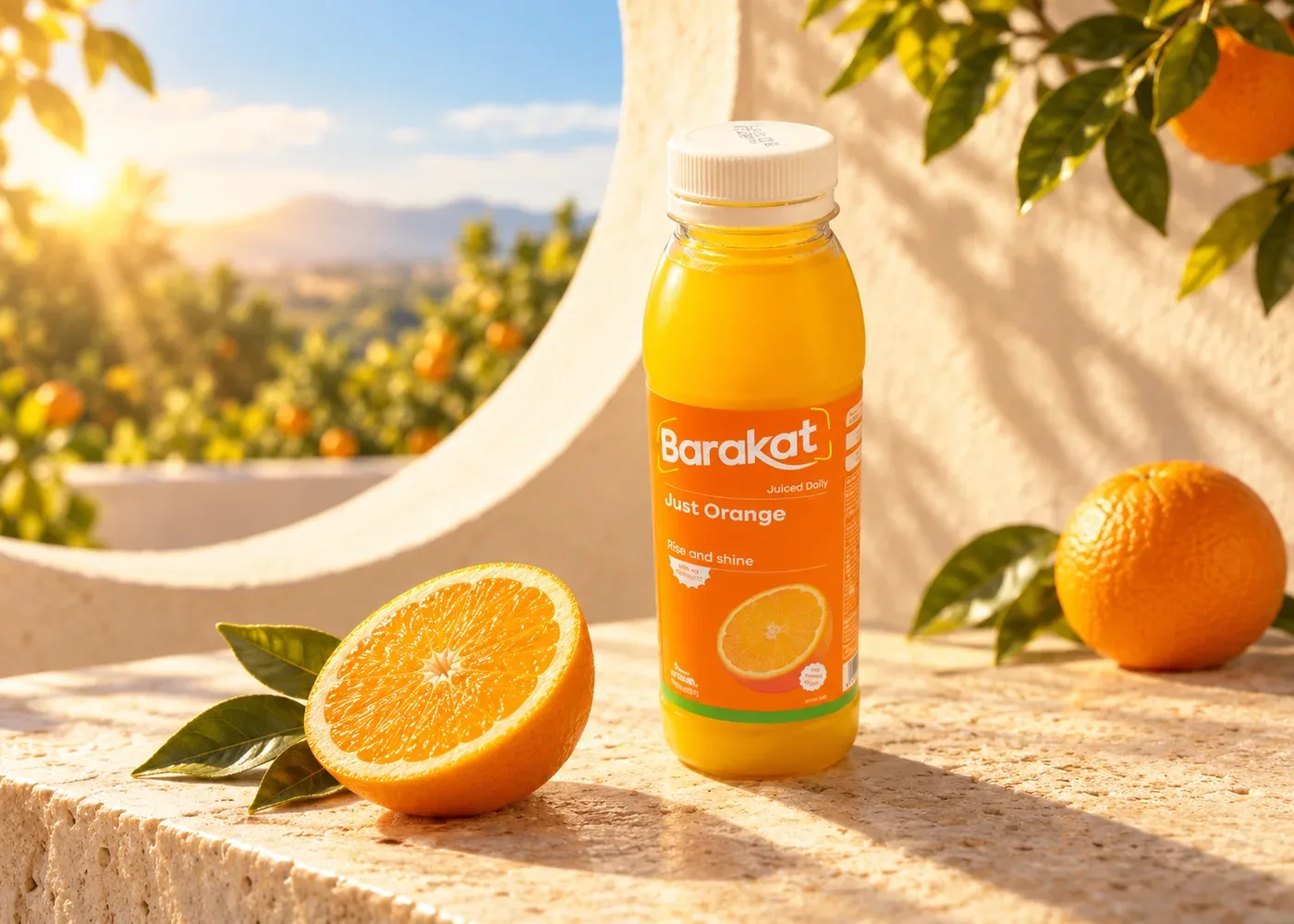
مثال أنشأناه بالذكاء الاصطناعي أثناء تطبيق الخطوات في الحلقة. تحقّق دائماً من تفاصيل المنتج قبل استخدام صورة كهذه.
ما الذي تحتاج إليه قبل أن تبدأ؟
صوّر المنتج بوضوح
ابدأ بتصوير المنتج الحقيقي. ستعتمد الأداة على هذه الصورة، وسترجع إليها عند مراجعة النتيجة.
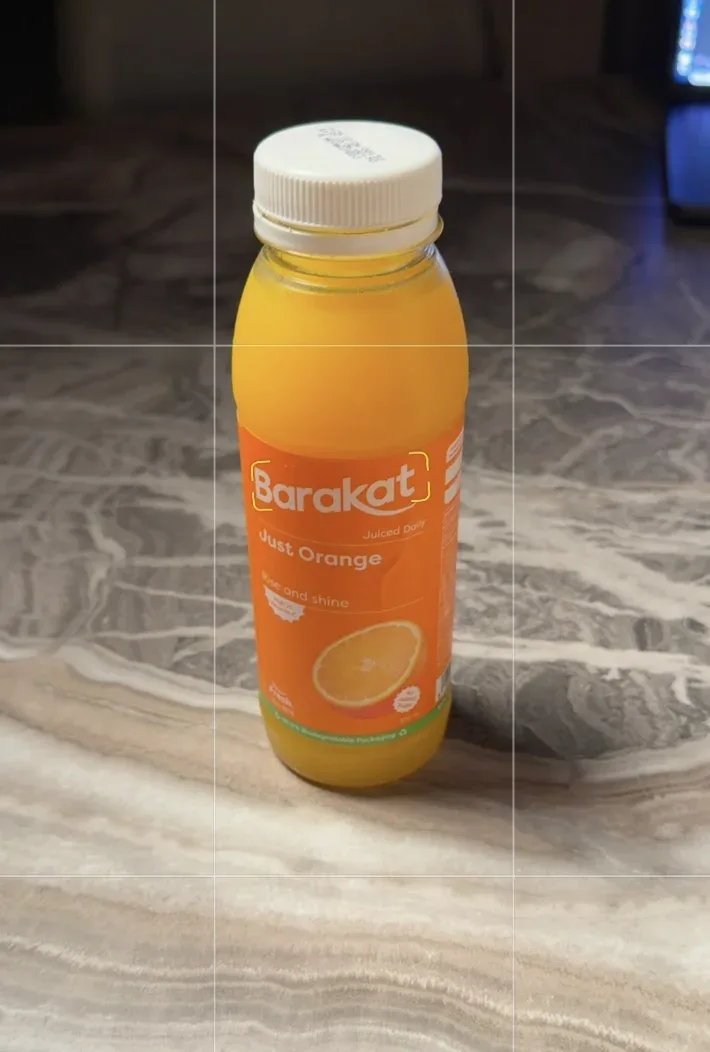
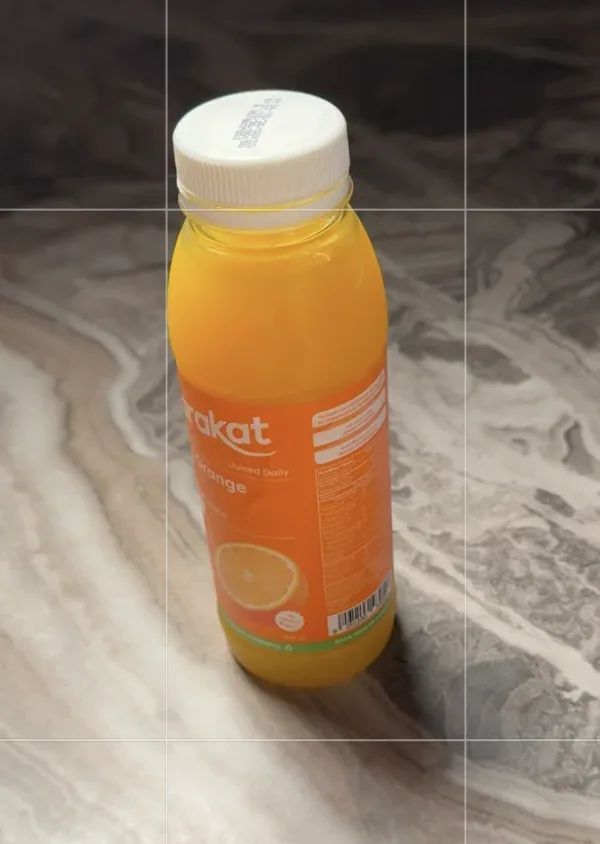
- أبقِ العبوة كاملة داخل الإطار، من الغطاء إلى القاعدة.
- اقترب من المنتج حتى يظهر الشعار بوضوح ويسهل قراءة النص، وتجنّب الانعكاسات التي تحجبهما.
- إذا كانت على جانب المنتج تفاصيل مهمة، فالتقط له صورة ثانية.
- ارفع ملف الصورة الأصلي إن أمكن، والتقط صورة أقرب إذا لم يكن النص واضحاً.
قبل الانتقال إلى الخطوة التالية: لا تعتمد على الأداة لتخمين تفاصيل لم تظهر في الصور. كلما اقتربت زاوية المشهد من زاوية الصورة الأصلية، قلّت حاجة الأداة إلى ابتكار جوانب لم تظهر فيها.
اختر الصور المرجعية وحدّد دور كل منها
ابحث في Pinterest أو Behance عن صور تعكس الأجواء التي تريدها، ثم صِف بوضوح ما أعجبك فيها.
أمثلة للبحث
orange juice product photography
beverage photography warm sunlight
minimal product photographyحدّد ما تريد الاستفادة منه في كل صورة مرجعية.
إضاءة جانبية ناعمة، أو ضوء شمس دافئ وظلال واضحة.
المنتج في المنتصف، مع مساحة حوله وقليل من عناصر التزيين.
خلفية هادئة، أو سطح حجري، أو ألوان تناسب المنتج.
مثال على ما يمكنك طلبه من الأداة
I want the warm lighting from the first reference and the space around the product from the second. Create a new scene that suits my product.استلهم الإضاءة وتوزيع العناصر، وتجنّب طلب نسخ إعلان كامل. لا تستبدل منتجك أو شعارك بالمنتج أو الشعار الظاهر في الصورة المرجعية.
ارفع الصور في رسالة واحدة
اختر أداة واحدة وتابع العمل في المحادثة نفسها. أرفق الصورة الأمامية للمنتج وصورته من الزاوية الإضافية والصور المرجعية التي اخترتها في الرسالة نفسها. تظهر أسماء أزرار ChatGPT وGemini هنا كما ترد في واجهتيهما باللغة الإنجليزية.
ChatGPT (ChatGPT Images 2.6)
افتح chatgpt.com أو التطبيق. في مربع الرسالة، اختر +، ثم Add photos & files، وحدّد صورك. ميزة الصور متاحة في جميع الخطط.
Gemini (Nano Banana 2)
افتح gemini.google.com أو التطبيق. اختر نموذج Flash أو Pro، ثم اختر Add files، وبعده Upload Files. يمكنك رفع ما يصل إلى 10 ملفات في كل طلب.
انتبه إلى هاتين النقطتين. في خطة ChatGPT المجانية، يمكنك رفع 3 ملفات فقط في اليوم. أرسل الصورة الأمامية مع صورتين مرجعيتين، أو استخدم خطة مدفوعة. في Gemini، يعتمد نموذج Flash-Lite على Nano Banana Lite، الذي لم يُصمَّم للعمل مع عدة صور مرجعية. اختر Flash أو Pro أولاً.
الصق البرومبت كاملاً كما هو
انسخ نص البرومبت الإنجليزي أدناه كاملاً كما هو، والصقه في الرسالة نفسها مع الصور. يحدّد النص دور كل صورة: تعتمد الأداة على صورة المنتج للحفاظ على هويته، وتستعين بالصور المرجعية الأخرى للإضاءة والأجواء فقط.
نص البرومبت الكامل
Act as an expert creative director, art director, and product photographer. Study the attached product image and reference images, then create an original, visually compelling image featuring my product.

Objective
Use the reference images to understand the artistic direction: their style, mood, atmosphere, lighting, colors, composition, and overall visual quality. Develop a fresh creative concept that brings those qualities to my product.
The finished image should feel visually connected to the references while introducing a clearly original idea, setting, and composition. Aim for a stronger image through thoughtful art direction, clear product presentation, and a distinctive visual story.

1. Understand the role of each attachment
Product image: the source of truth for the product
Carefully inspect the attached product before designing the scene. Preserve its identity and all visible defining features, including:
- Shape, silhouette, proportions, and construction.
- Materials, surface finish, texture, and actual colors.
- Logos, typography, label artwork, and placement of branding.
- Distinctive details such as edges, seams, engravings, openings, handles, caps, or other components, where applicable.
Keep the product accurate and recognizable. You may adapt its placement, lighting, reflections, and perspective to suit the new scene, but these changes must remain consistent with the same physical object.
Favor camera angles supported by the supplied product image. Avoid inventing unseen construction details, accessories, packaging, or label text. Include additional product components only when they appear in the supplied product images or are explicitly requested.
Reference images: the sources of artistic direction
Use these images to understand the desired visual treatment. Any products, logos, or branding appearing in the references belong to those references and should not transfer to my product.

2. Analyze the references before creating the image
Conduct a careful visual analysis of all the reference images. Identify the creative decisions that give them their particular look and emotional impact.
Study:
- Mood and personality: What does the image communicate: calm, energy, sophistication, warmth, precision, playfulness, mystery, or another feeling? Identify what in the image creates that impression.
- Color relationships: Dominant and accent colors, saturation, temperature, tonal range, and the relationship between the product and its surroundings.
- Lighting: Direction, softness or hardness, light sources, falloff, highlights, shadow density, rim lighting, reflections, and how light reveals materials.
- Composition: Product placement, framing, crop, balance, negative space, focal hierarchy, visual flow, and the relationship between foreground and background.
- Camera treatment: Viewpoint, perspective, apparent focal length, depth of field, focus placement, and sense of scale.
- Environment and materials: Background surfaces, textures, architectural elements, props, and how they support the product.
- Image treatment: Photographic realism, CGI characteristics, stylization, contrast, grain, sharpness, and retouching.
- Creative idea: The underlying visual story or relationship that makes the image memorable.
Distinguish the recurring stylistic qualities from incidental objects or arrangements. Translate the qualities that make the references effective into a new visual idea.
If the references differ substantially, choose the most appropriate one as the primary artistic direction. Incorporate compatible elements from the others selectively so the final image has one coherent visual language.

3. Develop a fresh concept specifically for my product
Use your understanding of the product and references to develop three distinct creative directions internally, then select the strongest one.
Each direction should have a meaningful central idea and a deliberate relationship to the product's visible design, materials, form, or clearly established purpose. Avoid inventing product benefits, ingredients, technical specifications, or performance claims.
Give the selected concept:
- A fresh visual premise.
- A purposeful setting or background.
- An original composition and spatial arrangement.
- Lighting that reveals the product beautifully.
- A clear emotional connection to the reference imagery.
Go beyond placing my product into an existing reference scene. Reimagine how the same artistic sensibility could produce a new image made specifically for this product.
You have substantial creative freedom over the environment, surfaces, props, atmosphere, framing, and visual storytelling. Keep the product itself faithful to the supplied image.
Interpret "better" as a clearer focal point, more intentional composition, stronger visual coherence, more convincing material rendering, and a more memorable idea. Every added element should contribute to the image.

4. Art-direct the finished image
Make my product the unmistakable hero. Its silhouette and defining features should remain readable, with a clear visual hierarchy that guides attention toward it.
Choose the camera angle, product placement, background, and lighting together as one integrated composition. Use negative space deliberately and ensure any props support the central idea.
Match the references' level of realism or stylization. Where the image depicts a physical scene, maintain believable perspective, scale, contact shadows, reflections, and material behavior. Where the concept uses surreal elements, make those elements visually intentional and internally consistent.
Render surfaces according to their actual material characteristics. Preserve natural texture and appropriate highlights without making every surface excessively glossy or artificially smooth.
Preserve existing product branding and label artwork accurately wherever visible. Add headlines, promotional copy, decorative typography, or new logos only if explicitly requested.

5. Review and deliver
Before finalizing, check that:
- The product matches the supplied product image.
- The references' mood and visual treatment are recognizably reflected in the result.
- The concept and composition are meaningfully original.
- The product remains the focal point.
- Lighting, perspective, materials, and shadows work coherently.
- Branding and visible product details are accurate.
- The frame is free of distracting clutter, accidental duplication, distorted geometry, and unwanted text.
Refine any weak areas before delivering.
Generate one finished product image at the highest supported quality and resolution. Use my requested aspect ratio; if none is specified, follow the primary reference's format while ensuring the product is framed effectively.
Keep the visual analysis and concept exploration internal. Return the final image.السطر الأخير: نسبة الأبعاد
Aspect ratio: 4:5أضف هذا السطر في نهاية الرسالة نفسها. تناسب نسبة 4:5 منشوراً عمودياً في موجز المنشورات. يمكنك أيضاً اختيار نسبة الأبعاد في ChatGPT من أداة aspect ratio picker.
صِف المشهد إن كان لديك تصور محدّد، ثم أرسل البرومبت
يتيح نص البرومبت للأداة اختيار المشهد مع الحفاظ على تفاصيل المنتج. إذا كنت تتصوّر مشهداً محدّداً، فأضف وصفاً موجزاً بعد سطر نسبة الأبعاد، بالإنجليزية أو العربية. وإن لم يكن لديك مشهد محدّد، فدع الأداة تقترح مشهداً مستوحى من الصور المرجعية.
مثال لعبوة العصير
Scene: the juice bottle on a light stone ledge on a terrace, with a citrus garden behind it. An orange and half an orange around the bottle, not covering the label.
Lighting: warm sunlight from the side of the scene, with a contact shadow under the bottle.
Angle: close to the front product photo.أرسل الرسالة وانتظر النتيجة. قد يستغرق إنشاء الصورة بضع دقائق. عندما تصبح جاهزة، افتحها بحجمها الكامل.
أنشأنا الصورة الأفقية في بداية الدليل بالذكاء الاصطناعي لبيان كيف يمكن تغيير المشهد. وللتأكد من مطابقة تفاصيل العبوة، قارنها بالصورة الأصلية.
كبّر، قارن، ثم صحّح
لا تكتفِ بجمال الخلفية عند تقييم النتيجة. افتح الصورة الأصلية والصورة الناتجة جنباً إلى جنب، وراجع تفاصيل المنتج.
ارتفاع العبوة وعرضها، وانحناء كتفها، وحجم غطائها.
لون المنتج والعبوة، وشفافية العبوة والانعكاسات عليها.
موضع كل منهما وحجمه واتجاهه على العبوة.
اسم المنتج وكل كلمة أو رقم يظهر في الصورة الأصلية، من دون أي إضافات.
الظل عند نقطة ملامسة المنتج للسطح، واستقرار المنتج عليه، وظهور الملصق كاملاً.
إذا لاحظت اختلافاً، فصِفه بدقة
The logo on the label is different from the original product photo. Fix it and keep the rest of the image exactly as it is.ثم قارن الصورتين مجدداً. في ChatGPT، يمكنك فتح الصورة واختيار Select، ثم تظليل الجزء الذي يظهر فيه الخطأ فقط ووصف التصحيح المطلوب. قد يصعب تحديد الموضع بدقة، لذا راجع الصورة كاملة بعد كل تعديل.
يوضّح نص البرومبت ما تريده، وبالمراجعة تحدّد ما إذا كانت الصورة صالحة للاستخدام. إذا بقي اختلاف عن الأصل في النص أو في تفاصيل هوية المنتج، فلا تستخدم الصورة في الإعلان. ادمج صورة المنتج الأصلية في المشهد يدوياً.
جرّب الخطوات على منتجك
المصادر: مركز مساعدة OpenAI (الصور في ChatGPT، ورفع الملفات والصوت إلى ChatGPT)، وإعلان OpenAI عن ChatGPT Images 2.6 (4 نوفمبر 2026)، ومركز مساعدة تطبيقات Gemini (إنشاء الصور وتعديلها، وإرفاق الملفات وتحليلها، والحدود وتوفّر الميزات). صور المثال من تطبيق صاحب الدليل للخطوات، وقد ولّد الذكاء الاصطناعي المشهد الإعلاني. قد تختلف الخطط والحدود والقوائم باختلاف الحساب والبلد. راجعنا المعلومات في نوفمبر 2026.
هل ترغبون في تطبيق ما تعلّمتموه مع فريقكم؟
أنا عبدالعزيز الشامسي، مدرب معتمد ومستشار في الذكاء الاصطناعي في أبوظبي. أدرّب فرق الجهات الحكومية والشركات على استخدام الذكاء الاصطناعي في عملها اليومي. راسلوني لنناقش جلسة تدريبية لفريقكم.